← Back to charts
AutoVera icon
GOOGLE PLAY

AutoVera

joaomgcd · Productivity · Japan store
NOT IN TOP 100 HERE
View on Google Play ↗
Revenue a month, worldwide
Too small to estimate
Not enough chart or ratings data
New ratings
Tracking
Daily counts start building from today
Countries it ranks in
0
was 0 on Oct 14, 2026

Revenue

Estimated from the grossing charts of Oct 21, 2026 in the 53 countries we track.

EST. REVENUE / MONTH · WORLDWIDE
Unranked
Not in a grossing chart in any country we track, so there is no rank to estimate from. Most unranked apps earn far less than charted ones, often close to nothing.
LIFETIME INSTALLS (GOOGLE)
25.1K
About 169 per month on average since launch
RATINGS
n/a
AVG RATING
n/a
PRICE
Free
IN APP PURCHASES
¥99 per item
CONTAINS ADS
Yes
LAST UPDATE
3719d ago
RELEASED
Jun 5, 2014
CONTENT RATING
Rated for 3+

Last 28 days

From our daily snapshots of every grossing chart.

DAYS IN A GROSSING CHART
0 / 28
COUNTRIES NOW
0 (was 0)
EST. REVENUE FROM CHARTS, DAILY · GOOGLE PLAY ONLY EST
Show daily values
Sep 24, 2026not in a grossing chart
Sep 25, 2026not in a grossing chart
Sep 26, 2026not in a grossing chart
Sep 27, 2026not in a grossing chart
Sep 28, 2026not in a grossing chart
Sep 29, 2026not in a grossing chart
Sep 30, 2026not in a grossing chart
Oct 1, 2026not in a grossing chart
Oct 2, 2026not in a grossing chart
Oct 3, 2026not in a grossing chart
Oct 4, 2026not in a grossing chart
Oct 5, 2026not in a grossing chart
Oct 6, 2026not in a grossing chart
Oct 7, 2026not in a grossing chart
Oct 8, 2026not in a grossing chart
Oct 9, 2026not in a grossing chart
Oct 10, 2026not in a grossing chart
Oct 11, 2026not in a grossing chart
Oct 12, 2026not in a grossing chart
Oct 13, 2026not in a grossing chart
Oct 14, 2026not in a grossing chart
Oct 15, 2026not in a grossing chart
Oct 16, 2026not in a grossing chart
Oct 17, 2026not in a grossing chart
Oct 18, 2026not in a grossing chart
Oct 19, 2026not in a grossing chart
Oct 20, 2026not in a grossing chart
Oct 21, 2026not in a grossing chart
Best rank Sep 24, 2026: not ranked. Now: not ranked. Days at zero are days outside every grossing chart.

Money and momentum

Measured from the store, not estimated.

WHAT IT CHARGES
¥99 per item
Google Play only shows the price range per item.
REVIEW MOMENTUM
0.1 reviews / week
  • Trendfalling
  • Recent reviews average3.5 stars
  • Recent 1 and 2 star share31%
From the latest 51 written reviews, covering 4521 days.

What users say

Latest reviews, Japan Google Play.

★★★★★Jun 17, 2025

Great.😃

★★★★★Nov 11, 2022

Great App. Really good. I need help troubleshooting a minor issue. Is anyone an advanced user to help?

★★★★★Jul 14, 2021

Very good

★★★★★Jul 8, 2021

Blocked out until I get my actual opinion okay you suck

★★★★★Oct 1, 2020

Works great and easy to use! I couldn't believe my luck that joaoapps has a Vera integration app. I did a lot of searching and could not find anything else that solves my Vera problems like this, and it does it really well. I use it to hook my Vera into Tasker and send triggers back to the Vera device (also for use with IFTTT).

★★★★★May 2, 2020

EDIT: GOT IT WORKING with generous help of dev. Solution: "Enter username in all lowercase!" Excellent and highly useful when working, but lately refuses to list my Vera. Will add stars back once solved (see EDIT).

Store screenshots

ScreenshotScreenshotScreenshotScreenshotScreenshotScreenshotScreenshotScreenshotScreenshotScreenshot

Growth research

Where this app is buying and earning its users. Each link opens pre filtered.

ASO keywords

Most repeated terms in the listing. Highlighted ones also appear in the title or short description.

home16autovera13tasker11control8devices8device6example6control home5home automation5automate4phone4plugin4off4status4vera4lights4automate home3home automate3autovera tasker3tasker plugin3home react3react anything3anything happens3happens home3

What's new in 1.0.16

- bug fixes

Store description

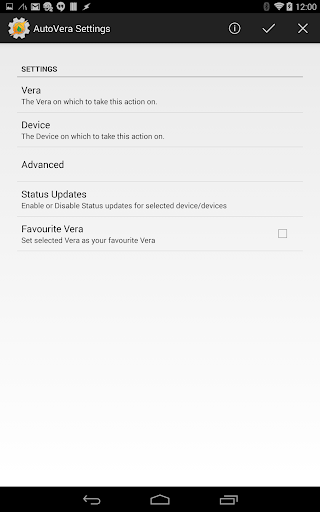
Automate your home and let your home automate your phone with AutoVera! Check out the AutoVera video here: http://youtu.be/ukJp8pRNszo Also, learn how to easily setup AutoVera in our handy guides: http://joaoapps.com/autovera ******IMPORTANT NOTE***** AutoVera is a Tasker plugin. You need to have Tasker (https://play.google.com/store/apps/details?id=net.dinglisch.android.taskerm) installed to use most of its features, so please be aware of that before using it. You can try out Tasker for free here: http://tasker.dinglisch.net/download.html ******************************** AutoVera is a Tasker plugin that allows you to fully control your home in a very easy, yet powerful way. It allows you to make your home react to anything that happens on your Android device, like opening your blinds in the morning when your alarm goes off, and to anything that your android device can detect, like if you flip your phone, you can flip out a light. It also allows you to react to anything that happens in your home in real time. For example, you can sound an alarm on your phone when a motion detector is tripped. You can even get the status or any other relevant information on your home automation devices and use it wherever and however you like. You can show the status of your devices on your Pebble (with AutoPebble) or on your TV for example (with AutoCast) DEVICE CONTROL With AutoVera you can control any Z-Wave devices through a Vera Gateway. With the Power of Tasker you can totally personalize how you do this, and really make home automation your own personal experience. You could turn on lights by wistling for example. Or setup a delayed light that turns off 5 minutes after you press a button so that you can go to bed with the lights still on. You can even control almost any plugin that is installed on your Vera, right out of the box. Even devices that weren't designed to work with the Vera in the first place! Check out the video to see many of the devices you can control. STATUS UPDATES By installing the AutoVera plugin on your Vera, you can receive updates on your phone whenever something happens in your home. So, for example, you can create your own Tasker widgets on your home screen that always update when a light is turned on or off independently of where the toggling occurred. Or you could build a whole beautiful Tasker scene showing the different states of your lights. You could be alerted when someone unlocks or opens your door. Or you can go all out and build a whole map of your house, showing which lights and locks are on and off, and make it all update in real time. With AutoVera you are always up to date to what is going on in your home. DEVICE INFORMATION You can also request information about your various devices. You can know everything about them, so even if you're not subscribed to their status updates, you can always know what the temperature is in your house, if your door is locked or what is currently playing in your Media Center. EASE OF USE AutoVera has several features that keep your setup in Tasker as simple and easy to maintain as possible. For example, by setting the nickname "favourite" on several of your devices, you can easily bring up a list of those devices and toggle them. And with the powerful advanced features of AutoVera, you can for example voice control any device in your home with just one Tasker Profile. It couldn't get any easier than this! CONCLUSION AutoVera gives you full control over your home or office at any time, from anywhere. It only makes sense to make your Android device the center of your home automation, because with Tasker and AutoVera, there's no limit to what you can automate. Control your Home. React to your Home. Automate Your Home.

See this store page in another country

Prices, ranks and reviews are per country. Revenue above is already worldwide.

More from joaomgcd

Tasker
4.0 ★
Analyze →
AutoSheets
Analyze →
AutoTools
4.5 ★
Analyze →
AutoApp for Arduino
Analyze →
Join by joaoapps
4.5 ★
Analyze →
AutoWear
5.0 ★
Analyze →
AutoInput
4.2 ★
Analyze →
AutoApps
4.5 ★
Analyze →
AutoVera Unlock Key
Analyze →