← Back to charts
Jnotes: Note-Taking, AI, PDF icon
GOOGLE PLAY

Jnotes: Note-Taking, AI, PDF

one of the handwritten notes · Productivity · Japan store
NOT IN TOP 100 HERE
View on Google Play ↗
Revenue a month, worldwide EST
$21.2K
Likely $7.1K to $63.5K
▼ 39.6% in 11 days
New ratings
Tracking
Daily counts start building from today
Rating
4.2 of 5
26.4K ratings in this store
Countries it ranks in
1
was 1 on Oct 15, 2026

Revenue

Estimated from the grossing charts of Oct 21, 2026 in the 53 countries we track.

EST. REVENUE / MONTH · WORLDWIDE · GOOGLE PLAY
$21.2K
Range $7.1K to $63.5K
EST. REVENUE / YEAR · WORLDWIDE
$253.9K
No App Store version found
LIFETIME INSTALLS (GOOGLE)
4.9M
About 91.6K per month on average since launch
WHERE IT EARNS · EST. / MONTH
  • Poland #47 Productivity$21.2K · 100%
HOW SURE ARE WE
Lower confidence: this app ranks below the overall top 50 everywhere, where single estimates can be off 2 to 4 times. The range is wide on purpose. Countries we don't track (and Google Play in China, which doesn't exist) aren't included, and neither are ads or web payments. Gross revenue before store fees.
RATINGS
26.4K
AVG RATING
4.21
PRICE
Free
IN APP PURCHASES
¥160 - ¥5,200 per item
CONTAINS ADS
No
LAST UPDATE
43d ago
RELEASED
May 6, 2022
CONTENT RATING
Rated for 3+

Last 29 days

From our daily snapshots of every grossing chart.

DAYS IN A GROSSING CHART
13 / 29
COUNTRIES NOW
1 (was 0)
EST. REVENUE A MONTH, DAILY · GOOGLE PLAY EST
Show daily values
Sep 24, 2026not in a grossing chart
Sep 25, 2026not in a grossing chart
Sep 26, 2026not in a grossing chart
Sep 27, 2026not in a grossing chart
Sep 28, 2026not in a grossing chart
Sep 29, 2026not in a grossing chart
Sep 30, 2026not in a grossing chart
Oct 1, 2026not in a grossing chart
Oct 2, 2026not in a grossing chart
Oct 3, 2026not in a grossing chart
Oct 4, 2026not in a grossing chart
Oct 5, 2026not in a grossing chart
Oct 6, 2026not in a grossing chart
Oct 7, 2026not in a grossing chart
Oct 8, 2026not in a grossing chart
Oct 9, 2026not in a grossing chart
Oct 10, 2026$35K a month
Oct 11, 2026$28K a month
Oct 12, 2026$27.8K a month
Oct 13, 2026$24.4K a month
Oct 14, 2026$28K a month
Oct 15, 2026$27.8K a month
Oct 16, 2026$25.6K a month
Oct 17, 2026$26.1K a month
Oct 18, 2026$21.5K a month
Oct 19, 2026$23K a month
Oct 20, 2026$23.1K a month
Oct 21, 2026$21.2K a month
Oct 22, 2026not in a grossing chart
The same estimate as the headline, saved every day. Best rank Sep 24, 2026: not ranked. Now: #46 Productivity · PL.

Money and momentum

Measured from the store, not estimated.

WHAT IT CHARGES
¥160 - ¥5,200 per item
Google Play only shows the price range per item.
REVIEW MOMENTUM
7.2 reviews / week
  • Trendfalling
  • Recent reviews average3.6 stars
  • Recent 1 and 2 star share28%
From the latest 500 written reviews, covering 489 days. The store only returns this many, so this is the most recent slice.
RATING BREAKDOWN
26.2K ratings
5★58%
4★21%
3★11%
2★4%
1★6%

What users say

Latest reviews, Japan Google Play.

★★★★★Oct 21, 2026

ok

★★★★★Oct 17, 2026

HAPPY USER

★★★★★Oct 16, 2026

Could not be tested. Instead of functions it issued ads for an upgrade. Published explanations incorrect.

★★★★★Oct 15, 2026

Really easy app to use. Even without paying for premium there are a lot of features. Love that I can turn PDFs into notes and annotate, especially as a university student.

★★★★★Oct 15, 2026

Speaking about functions - best app for me But unfortunately it has a huge bug. When I export some hand written text as a png the text misses some letters. Sometimes it's half a word. That's really annoying. So that bug makes me make screenshot of the screen instead of share option. 😢

★★★★★Oct 11, 2026

I have used various note making app, but it is the best.

Apps like this

Same category, earning about as much.

Store screenshots

ScreenshotScreenshotScreenshotScreenshotScreenshotScreenshotScreenshotScreenshotScreenshotScreenshot

Growth research

Where this app is buying and earning its users. Each link opens pre filtered.

ASO keywords

Most repeated terms in the listing. Highlighted ones also appear in the title or short description.

notes18jnotes9handwriting6note4stylus4digital4handwritten4pdfs4powered notes3pdf annotation3annotation editing3editing tools3handwriting recognition3recognition ocr3rich note3note formats3lag handwriting3handwriting stylus3handwritten content3directly pdfs3multi window3tablet3pdf3editing3

What's new in 3.6.4.2-gp

3.6.4.2-gp, update content: 1. Fix PDF export failure issue.

Store description

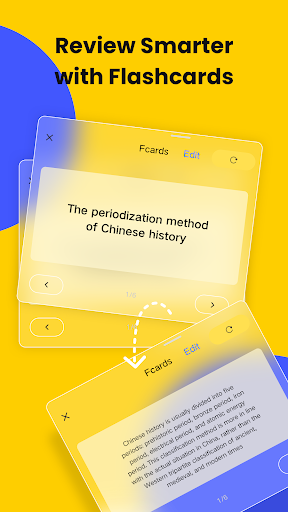
✨ Why Jnotes? The best Goodnotes alternative for Android users! Looking for the ultimate note-taking app for your Android tablet? 📝 Jnotes offers smooth stylus writing, AI-powered notes, PDF annotation and editing tools, handwriting recognition (OCR), and rich note formats. Start creating smart, organized, and beautiful digital notes today! ✏️ Smooth Digital Handwriting • Customizable pen colors and thickness. • Advanced digital ink technology ensures lag-free handwriting with stylus support. • Draw mind maps, write naturally, and enjoy refined stylus compatibility. • Handwriting Recognition (OCR): Search, edit, and export handwritten content effortlessly. 🤖 AI-Powered Notes & Summary • AI Summary: Quickly generate accurate summaries of your notes. • AI Flashcards: Turn notes into interactive quizzes with AI highlighting key terms. • AI Quizzes & Tests: Generate comprehensive quizzes (incl. single-select, multiple-choice, true/false, open-ended questions, case studies) for quick knowledge verification and gap identification. • Multimodal AI Notes: Generate intelligent notes from documents (PDF, DOCX, PPTX, MD), media files (MP3, MP4, MOV), and images. 📄 PDF Annotation & Editing • Import PDFs and annotate with a full toolkit. • Add handwritten notes, comments, and highlights directly on PDFs. • Multi-Window Support: Use multi-window reading and annotating. • Convert, translate, copy-paste, and export PDFs easily. 🎨 Extensive Customization Options • Switch between Dark Mode and Eye-Comfort Mode. • Choose from various interface themes and styles for notebook personalization. • Import custom fonts for unique, aesthetic notes. 📚 Rich Note Formats • Vast Library: Tons of templates, covers, and stickers to make your notes pop. • Powerful editing tools: stroke modification, auto-shape drawing, image insertion. • Sync audio recordings with drawings and text for multimedia notes. 🗂️ Efficient Note Management • Organize notes in multi-level folders. • Quick search for typed or recognized handwritten content. • Backup your notes locally for extra security. Core Uses of Jnotes 🎓 For Students • Use Cornell Notes templates for structured study notes, college work, and test prep. • Turn long notes into easy-to-review summaries with AI Summary. • Automatically create interactive flashcards using AI. • Annotate, highlight, and write directly on PDFs with ease. 💼 For Professionals • Grab templates for meeting notes, business reports, and project management. • Record voice notes during meetings and sync them with handwritten or typed text. • OCR instantly converts handwriting into searchable, editable text. 🖊️ For Journaling & Planning • Use Jnotes as a daily planner, personal journal, or creative notebook. • Enjoy realistic, lag-free handwriting with stylus input. • Plan everything—from meals to workouts—or sketch your next big idea. 📌 How to Get Help / Stay Connected 📥 Email: Jnotes_offer@jideos.com (Include your Jnotes version, tablet model, screenshot/video, and issue description) 💬 Social Media: - Instagram: @jnotesapp - X: @Jnotes_official - YouTube: @jnotes5711 🚀 Download Jnotes now and transform your Android tablet into the most powerful digital notebook today! ⭐ Loving Jnotes? We'd be thrilled if you left us a 5-star review on the Play Store! Your feedback helps us keep improving!

See this store page in another country

Prices, ranks and reviews are per country. Revenue above is already worldwide.