← Back to charts
3D Modeling App: Sculpt & Draw icon
GOOGLE PLAY

3D Modeling App: Sculpt & Draw

3D Modeling Apps · Art & Design · Japan store
NOT IN TOP 100 HERE
View on Google Play ↗
Revenue a month, worldwide EST
$73.6K
Likely $24.5K to $220.8K
New ratings
Tracking
Daily counts start building from today
Rating
4.0 of 5
19.6K ratings in this store
Countries it ranks in
1
was 0 on Oct 15, 2026

Revenue

Estimated from the grossing charts of Oct 21, 2026 in the 53 countries we track.

EST. REVENUE / MONTH · WORLDWIDE · GOOGLE PLAY
$73.6K
Range $24.5K to $220.8K
EST. REVENUE / YEAR · WORLDWIDE
$883.2K
No App Store version found
LIFETIME INSTALLS (GOOGLE)
14.3M
About 481.2K per month on average since launch
WHERE IT EARNS · EST. / MONTH
  • United States #100 Art & Design$73.6K · 100%
HOW SURE ARE WE
Lower confidence: this app ranks below the overall top 50 everywhere, where single estimates can be off 2 to 4 times. The range is wide on purpose. Countries we don't track (and Google Play in China, which doesn't exist) aren't included, and neither are ads or web payments. Gross revenue before store fees.
RATINGS
19.6K
AVG RATING
3.95
PRICE
Free
IN APP PURCHASES
¥110 - ¥4,680 per item
CONTAINS ADS
Yes
LAST UPDATE
37d ago
RELEASED
Apr 30, 2024
CONTENT RATING
Rated for 3+

Last 29 days

From our daily snapshots of every grossing chart.

DAYS IN A GROSSING CHART
2 / 29
COUNTRIES NOW
1 (was 0)
EST. REVENUE FROM CHARTS, DAILY · GOOGLE PLAY ONLY EST
Show daily values
Sep 24, 2026not in a grossing chart
Sep 25, 2026not in a grossing chart
Sep 26, 2026not in a grossing chart
Sep 27, 2026not in a grossing chart
Sep 28, 2026not in a grossing chart
Sep 29, 2026not in a grossing chart
Sep 30, 2026not in a grossing chart
Oct 1, 2026not in a grossing chart
Oct 2, 2026not in a grossing chart
Oct 3, 2026not in a grossing chart
Oct 4, 2026not in a grossing chart
Oct 5, 2026not in a grossing chart
Oct 6, 2026not in a grossing chart
Oct 7, 2026not in a grossing chart
Oct 8, 2026not in a grossing chart
Oct 9, 2026not in a grossing chart
Oct 10, 2026not in a grossing chart
Oct 11, 2026not in a grossing chart
Oct 12, 2026not in a grossing chart
Oct 13, 2026not in a grossing chart
Oct 14, 2026not in a grossing chart
Oct 15, 2026not in a grossing chart
Oct 16, 2026not in a grossing chart
Oct 17, 2026not in a grossing chart
Oct 18, 2026not in a grossing chart
Oct 19, 2026not in a grossing chart
Oct 20, 2026not in a grossing chart
Oct 21, 2026$73.6K · 1 country
Oct 22, 2026$73.6K · 1 country
Best rank Sep 24, 2026: not ranked. Now: #100 Art & Design · US. Days at zero are days outside every grossing chart.

Money and momentum

Measured from the store, not estimated.

WHAT IT CHARGES
¥110 - ¥4,680 per item
Google Play only shows the price range per item.
REVIEW MOMENTUM
12 reviews / week
  • Trendsteady
  • Recent reviews average3.7 stars
  • Recent 1 and 2 star share24%
From the latest 500 written reviews, covering 290 days. The store only returns this many, so this is the most recent slice.
RATING BREAKDOWN
19K ratings
5★55%
4★15%
3★15%
2★2%
1★13%

What users say

Latest reviews, Japan Google Play.

★★★★★Oct 19, 2026

cool

★★★★★Oct 19, 2026

Absolutely bogus app. not even basic modling function included.

★★★★★Oct 18, 2026

Very useful and creative app. Amazing to have on a mobile device.

★★★★★Oct 17, 2026

GOOOOOOOOOOOD

★★★★★Oct 17, 2026

it's very. good

★★★★★Oct 16, 2026

Please give us Finger Drawing mode.

Apps like this

Same category, earning about as much.

Store screenshots

ScreenshotScreenshotScreenshotScreenshotScreenshotScreenshotScreenshotScreenshotScreenshotScreenshot

Growth research

Where this app is buying and earning its users. Each link opens pre filtered.

ASO keywords

Most repeated terms in the listing. Highlighted ones also appear in the title or short description.

design9tools8create7objects6drawing6maker6select5faces5edge5modeling4move4vertices4off4create characters3characters design3design games3design drawing3move rotate3vertices edges3edges faces3faces objects3create faces3vertices edge3values display3

What's new in 1.20.18

- Minor bug fixes

Store description

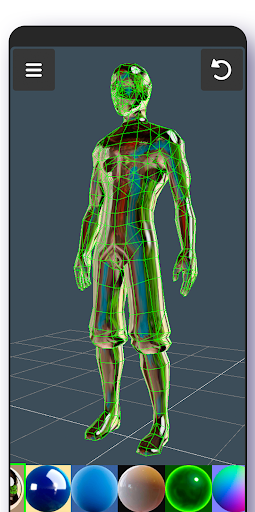
3D Modeling App allows you to easily make 3D models, objects, art and cgi graphics, paintings, create 3d characters and design 3d games on the go using gestures on your mobile phone or tablet. Our 3d editing app stands out from other drawing apps for adults. Create a multitude of 3d objects for business. It is a useful addition to the toolkit of many professionals: use it as a 3d graphic design app, a 3d builder design app, a 3d drawing app for engineering, a landscape design drawing app, a 3d furniture design app, an industrial design app, and one of the best woodworking design apps. Automotive engineers can even use it for car design. For those looking for the best digital canvas for 3d pen work, painting, or sketching, 3D Modeling App is also a 3d painting app and 3d sketch maker. Find the right 3d brush for your task. Are you a crafter and maker who has long been looking for an all-around 3d art maker? Look no further. No stylus pen is required for 3d pencil drawing, but if you are an artist who relies on one, our drawing editor app supports it. Test your abilities as a digital sculptor, since 3D Modeling App is also a 3d sculpting app. For the model makers, it is also a 3d model maker and 3d object maker. This is the cgi creator for fast 3d. And for game designers and developers, we provide a tool that lets you create 3d characters and design 3d games. It's the 3d animator you need to create cut scenes. Also use it to make 3d models of your characters and to accurately model 3d physics. Or try out the app as a 3d map maker to flesh out an immersive world for your game and 3d character. Tons of features: 1. Fast workflow: - Move and rotate 3d images, and scale 3d objects and the camera using gestures. Quickly switch between tools. - Easily multi-select vertices, edges, faces, and objects by long tapping or drawing frames. 2. Vertex tools for 3d geometry: merge (target merge, collapse edges, collapse faces), connect, and create faces using vertices. 3. Edge tools: Draw a cut using a single swipe or by select one point by point, cut a loop (create new edge-loops), select a loop (also by double tapping), extrude, delete, select ring, create 3d faces using the border edge (fill in the hole). 4. Face tools: Extrude, draw a face using set points, detach, clone, select shell (also by double tap), reverse, delete. 5. Object tools: Combine/separate, clone, mirror, smooth, divide, and soft/hard normals. 6. Sculpting tools: Move, screen, push, pull, and smooth. You can adjust brush size and strength. 7. Display tools: - Grid with settable size and snapping values. - Display info: Triangles count, distance between vertices, and edge length. - Wireframe on/off, shaded on/off. - Shadows on/off. - Axis on/off. 8. Coloring: Vertex color painting. 9. You can apply up to 20 materials to your objects. 10. Additional tools: - Orthographic camera. - Set move, rotate, and scale precise values. - Display selected (isolate selection). - Grow selection and convert selection. - Move vertices, edges, 3d faces, and objects freely without grid snap. - Snap: Grid, rotate angle, 2 axis plane, local space, physical penetration, ortho cam snap. - Auto-save. 11. Export & import .obj files: - Can be imported in 3D modeling software: 3ds Max \ Maya \ Blender \ Zbrush \ Modo \ Adobe Photoshop \ Adobe Illustrator \ MeshMixer \ Concepts \ Netfabb \ Forger - Can be imported in CAD software: Autodesk AutoCAD \ SolidWorks \ Tinkercad \ NX \ Catia \ Solid Edge \ Autodesk Fusion 360 \ Rhino \ Onshape \ Trimble Sketchup \ Maxon Cinema 4D (C4D) \ Autodesk Alias - Can be converted to the following file formats using 3rd party converters: IGS \ IGES \ STP \ STEP \ JT \ SAT \ X_T \ X_B \ BREP \ WRL \ X3D \ 3DM STL \ DAE \ DXF \ GLTF \ FBX \ IFC \ 3DS to further import to Shapr3d (Shapr) or uMake 12.

See this store page in another country

Prices, ranks and reviews are per country. Revenue above is already worldwide.