← Back to charts
Retro Txt T9 Number Keyboard icon
APP STORE

Retro Txt T9 Number Keyboard

Digital Tools Ltd · Utilities · United States store
NOT IN TOP 100 HERE
View on App Store ↗
Revenue a month, worldwide EST
$329
Likely $110 to $988
New ratings
Tracking
Daily counts start building from today
Rating
3.9 of 5
128 ratings in this store
Countries it ranks in
0
was 0 on Oct 15, 2026

Revenue

Estimated from the grossing charts of Oct 21, 2026 in the 53 countries we track, and ratings growth on the App Store.

EST. REVENUE / MONTH · WORLDWIDE · FROM RATINGS GROWTH
$329
Range $110 to $988
EST. REVENUE / YEAR · WORLDWIDE
$4K
2.4 new ratings a month on average since launch
EST. LIFETIME DOWNLOADS
4.5K to 12.8K
Estimated from ratings count
WHERE ITS USERS ARE · SHARE OF RATINGS
  • United States 128 ratings37%
  • Philippines 55 ratings16%
  • Indonesia 32 ratings9%
  • Pakistan 31 ratings9%
  • United Kingdom 15 ratings4%
  • India 15 ratings4%
  • Germany 11 ratings3%
  • Mexico 11 ratings3%
HOW SURE ARE WE
Not in any grossing chart, so this comes from ratings growth (2.4 new ratings a month on average since launch): about $100 a month per new rating a month. Tested on 418 apps with verified revenue: typically off by about 2 times, and big earners tend to come out low. Countries we don't track (and Google Play in China, which doesn't exist) aren't included, and neither are ads or web payments. Gross revenue before store fees.
RATINGS
128
AVG RATING
3.88
PRICE
Free
AGE
11.9y
LAST UPDATE
38d ago
VERSION
2.10.0
SIZE
24 MB
AGE RATING
4+

Last 29 days

From our daily snapshots of every grossing chart.

DAYS IN A GROSSING CHART
0 / 29
COUNTRIES NOW
0 (was 0)
EST. REVENUE FROM CHARTS, DAILY · APP STORE ONLY EST
Show daily values
Sep 24, 2026not in a grossing chart
Sep 25, 2026not in a grossing chart
Sep 26, 2026not in a grossing chart
Sep 27, 2026not in a grossing chart
Sep 28, 2026not in a grossing chart
Sep 29, 2026not in a grossing chart
Sep 30, 2026not in a grossing chart
Oct 1, 2026not in a grossing chart
Oct 2, 2026not in a grossing chart
Oct 3, 2026not in a grossing chart
Oct 4, 2026not in a grossing chart
Oct 5, 2026not in a grossing chart
Oct 6, 2026not in a grossing chart
Oct 7, 2026not in a grossing chart
Oct 8, 2026not in a grossing chart
Oct 9, 2026not in a grossing chart
Oct 10, 2026not in a grossing chart
Oct 11, 2026not in a grossing chart
Oct 12, 2026not in a grossing chart
Oct 13, 2026not in a grossing chart
Oct 14, 2026not in a grossing chart
Oct 15, 2026not in a grossing chart
Oct 16, 2026not in a grossing chart
Oct 17, 2026not in a grossing chart
Oct 18, 2026not in a grossing chart
Oct 19, 2026not in a grossing chart
Oct 20, 2026not in a grossing chart
Oct 21, 2026not in a grossing chart
Oct 22, 2026not in a grossing chart
Best rank Sep 24, 2026: not ranked. Now: not ranked. Days at zero are days outside every grossing chart.

Money and momentum

Measured from the store, not estimated.

WHAT IT CHARGES
1 purchase listed
  • Premium$4.99
Top in-app purchases as listed on the App Store, in local prices.
REVIEW MOMENTUM
0.1 reviews / week
  • Trendrising
  • Recent reviews average2.9 stars
  • Recent 1 and 2 star share47%
From the latest 38 written reviews, covering 4216 days.
RELEASE CADENCE
2 updates in 90 days
  • Typical gap between releases40 days
From the last 25 versions listed on the App Store.
RATING BREAKDOWN
128 ratings
5★60%
4★10%
3★6%
2★5%
1★19%

What users say

Latest reviews, United States App Store.

★★★★★Jul 9, 2026
It’s not T9

It makes the keyboard *look* like T9, but it’s not. It’s predictive and it’s limited in its capacity to do so. Typing “old school” abbreviations is impossible because it guesses what you’re trying to say and gets it wrong. T9 texting meant pressing buttons several times to get the correct letter and that isn’t how this app works. The only things it has in common with old texting is the layout and the fact that is in fact more time consuming. But it doesn’t feel nostalgic either. So it fails at being useful or fun.

★★★★★Jun 11, 2026
Full Access Non-Optional

Most keyboards have an option to turn on/off full access. This one inserts itself into iOS list off keyboards with full access enabled and no way to turn that off! That means those keyboards can capture everything you type she send it to a third party. Absolute non-starter... you are crazy if you use this!

★★★★★Mar 28, 2026
SO close to the original T9, but not quite!

I absolutely LOVED T9 “back in my day”, and this app is so close to how it was! It was incredibly nostalgic to use again. I do, however, wish that it was like the old T9 keyboards where it allow you to switch to “multi-tap” mode for individual spelling of words that isn’t in the typical “predictable text” options. Maybe I can’t figure it out despite having read the directions, but I can’t get the keyboard to allow for individual letters. I also wish it had the typical key that “set” a word in and then the word could be manipulated after rather than it deleting the whole word/changing the entire word again like the old T9 had. If you hit “>” then it would set the word. Removing the middle-of-typing blue highlight IYKYK 😂 Overall I love the app!

★★★★★Mar 19, 2026
As described!

I'm not sure what any of the bad reviews are about (and I’m glad I didn’t pay them any mind) because this app is exactly what it set out to be! If you need any help understanding how to get to the other characters (such as ?,!,&,@, etc.) just click on the FAQ link in the settings. There, they have a nice reference chart. All the characters can be used on the keyboard. Great, simple app!

★★★★★Jan 19, 2026
Ya

Ya

★★★★★Jan 4, 2026
High hopes for this app

Really wished it worked better than claimed. Pressing space 2times did not give a period. Can’t access your emojis. $4.99 for not getting a functioning keyboard. Will be asking for a refund. The app was not designed well unfortunately. Added some words to my dictionary and they weren’t being picked up. Trying to type “Happening” not happening lol. I loved using that type of keyboard and wanted to use it again but this app was a dud. Don’t waste your money on this one. I really wanted to like it.

Store screenshots

ScreenshotScreenshotScreenshotScreenshotScreenshotScreenshotScreenshotScreenshotScreenshotScreenshot

App Store ads

Apple Search Ads this app ran in the last 90 days, from Apple's public ad repository.

Apple's ad repository couldn't be reached right now. Try again later.

Growth research

Where this app is buying and earning its users. Each link opens pre filtered.

ASO keywords

Most repeated terms in the listing. Highlighted ones also appear in the title.

retro txt10retro8txt6texting4nostalgia3keyboard3text3phone2experience2making2past2keyboards2unique2touch2typing2time2

What's new in 2.10.0

# New Feature * Added new keyboard tester, so you can tryout the app and the keyboards before adding to your device. * Added support for new devices and latest software # Bug Fixes This update also has a few minor bug fixes and performance improvements Happy Typing!

Released Nov 13, 2014. Current version shipped Sep 13, 2026.

Store description

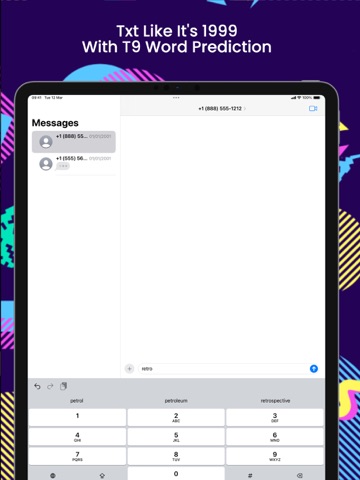
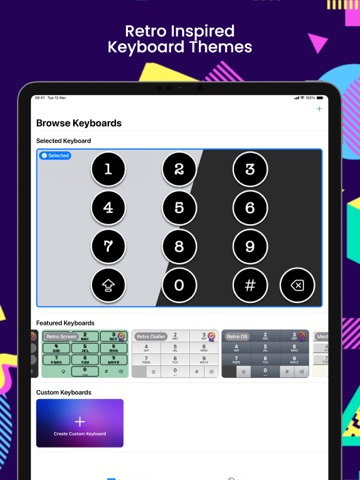
Dive back into the nostalgia of the '90s with Retro Txt, the keyboard app that transforms your cutting-edge smartphone into a classic T9 cell phone. Remember the days when texting required a bit of skill, pressing '2' three times for 'c', and twice for 'b'? Retro Txt brings that memorable experience right to your fingertips, making every message a throwback adventure. Why settle for ordinary when you can stand out? Retro Txt is perfect for those who miss the simplicity of the past or find modern keyboards too cramped for comfort. It's a breeze to use, offering the charm of retro texting combined with the convenience of your iPhone or iPad. With Retro Txt, you get: - A nostalgia-packed T9 keyboard that's easy to use system-wide. - Advanced T9 predictive text. - A variety of retro styles to customize your keyboard, ensuring it matches your unique taste. - The ability to craft your own custom keyboards for that personal touch. - A customizable T9 dictionary, making typing faster and more intuitive. - Large buttons designed to accommodate all finger sizes, eliminating typos and frustration. - Smart keypress technology: multiple presses on the same key produce different letters. - A high-speed mode for those who've mastered the art of rapid texting. - A dedicated number lock for switching between text and numbers effortlessly. - Quick shortcuts for spaces, periods, and special characters, streamlining your typing experience. Retro Txt is not just an app; it's a time machine for your phone. Compatible with both iPhone and iPad, it offers a seamless blend of the past and present. Whether you're texting, taking notes, or updating your status, Retro Txt makes every interaction fun and unique. Get ready to Text Like It's 1999! Download RetroTxt now and add a touch of nostalgia to your digital life. Some features require a one-time in-app purchase to enable.

See this store page in another country

Prices, ranks and reviews are per country. Revenue above is already worldwide.

More from Digital Tools Ltd

Originals for Netflix
Entertainment
4.1K ratingsAnalyze →
Originals for Hulu
Entertainment
579 ratingsAnalyze →
Discover Streaming Originals
Entertainment
777 ratingsAnalyze →
Originals for Prime Video
Entertainment
288 ratingsAnalyze →
Wall Monitor for Tesla
Utilities
831 ratingsAnalyze →
NZBClient for NZBGet
Utilities
101 ratingsAnalyze →
Originals for BBC
Entertainment
160 ratingsAnalyze →
Summarify: AI For YouTube
Productivity
437 ratingsAnalyze →
Rivr: Track Shows & Movies
Entertainment
221 ratingsAnalyze →