ASO keywords
Most repeated terms in the listing. Highlighted ones also appear in the title.
online9customers8shopify6sales6track5staff5retail4sell4performance4inventory4checkout4customer4create4track performance3online sales3credit cards3inventory available3shopify admin3help3orders3locations3give3shopping3pay3
What's new in 11.17.1
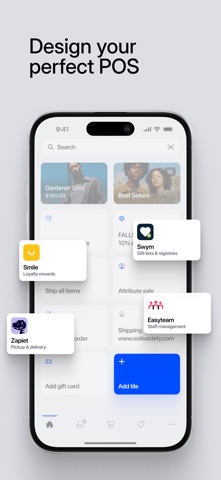
- POS Editor can now suggest Smart Grid tiles based on the products and discounts staff use most.
- Add product variant tiles and new Analytics, Register, and Scan shortcuts to Smart Grid.
- Recognize more customers automatically when a buyer taps their card: repeat customers are linked to the order, new customers—when recognized by Shopify—are added as customers after selecting a digital receipt, and buyers with a Shop app profile get receipts automatically sent to Shop after one-time consent.
Released Aug 28, 2013. Current version shipped Oct 17, 2026.
Store description
Shopify POS unifies your online and retail stores to strengthen sales conversions everywhere you sell, streamline store management, and help you build stronger relationships with your customers. It has all the essential features you need to make sales, track performance, and manage customers, orders, and inventory. With local pickup and delivery — and the ability to sell from other locations — you can reach more customers and give them seamless shopping experiences.
Learn why retailers using Shopify grow revenue by 30% year over year by unifying online and in-store sales.
CHECKOUT’S BEST FRIEND
• Take your smartphone or tablet to your customer—and sell anywhere in-store.
• Securely accept all major credit cards, Apple Pay, Google Pay, Shop Pay, and cash.
• Process all credit cards at the same low rate with no hidden fees with Shopify Payments.
• Automatically apply the correct sales tax at checkout based on your store’s location.
• Collect customer contacts with SMS and email receipts.
• Customize printed receipts with your website URL, store hours, promotions, or store policies.
• Save carts and retrieve them later to continue serving other customers quickly.
• Create discounts and promo codes that span your ecommerce and retail business.
• Scan product barcode labels with the camera on your phone or tablet.
• Identify store staff that helped with a sale to keep track of performance.
• Integrate barcode scanners, cash drawers, receipt printers, and more.
MAKE THE SALE EVERY TIME—FROM ONLINE TO CHECKOUT LINE
• Email carts to customers to remind them of their in-store favorites so they can buy online.
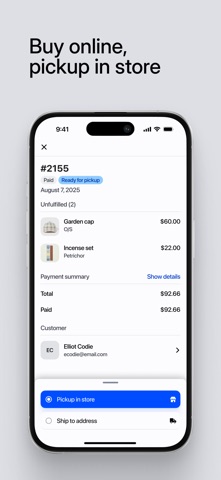
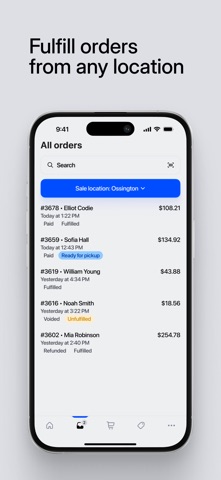
• Track all pickup orders from your online store and notify customers when they’re ready.
• Sell inventory available at other locations and automatically calculate the right shipping rates at checkout.
TURN ONE-TIME CUSTOMERS INTO LIFETIME FANS
• Easily exchange and return items purchased online or at other locations.
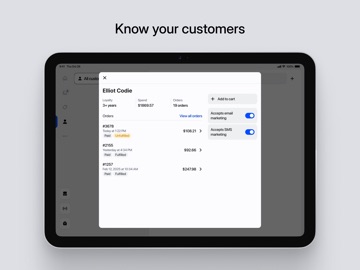
• Create fully-synced customer profiles so staff can give every customer a personal shopping experience with quick access to notes, lifetime spend, and order history.
• Add loyalty apps to your POS to reward customers for shopping with you, both in-store and online.
• Create personalized marketing campaigns via email and social media in your Shopify admin.
STREAMLINE OPERATIONS
• Manage one product catalogue and sync inventory so it’s available for online and in-person selling.
• Create staff login PINs to secure access and track activity.
• Use customizable role-based permissions to give staff the right level of access.
• Make informed decisions with insights on your store’s daily sales performance.
• Track payments to hold staff accountable for transactions by payment types and cash handled.
• Adapt to growing trends in your business with unified analytics that blend in-store and online sales in your Shopify admin
• Generate purchase orders and transfer stock based on inventory forecasts and performance.
"It’s impossible to think of retail as separate. You have to be able to bring the physical into the digital, and the digital into the physical...this idea of unified retail is the future.”
Juliana Di Simone, Tokyobike
Questions?
We'd love to learn more about your business and how we can help.
https://help.shopify.com/
See this store page in another country
Prices, ranks and reviews are per country. Revenue above is already worldwide.