ASO keywords
Most repeated terms in the listing. Highlighted ones also appear in the title.
time4red4watch4display4clock4green4spin crown3amber phosphor3phosphor green3move ring3ring fills3mission briefing3switch3tunnel3range3spin3crown3tap3crawl3move3through3moon3ring3off2
What's new in 6.0
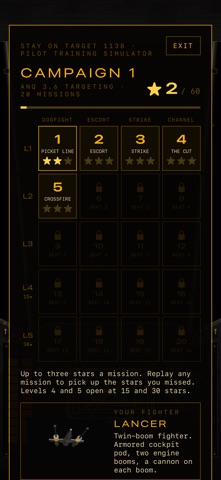
PILOT TRAINING SIMULATOR
Tap FLY on the iPhone console and take the controls. Twenty short missions, a few minutes each: dogfights, convoy escorts, carrier strikes and low runs down a narrow service channel.
• Earn up to three stars on every mission: finish it, keep your shields up, and beat the mission's own challenge. Replay any mission for the stars you missed.
• Win a mission to open the next one in its line. The last two levels open with stars.
• The cockpit's targeting computer is the ANq 3.6 from this app, tracking and locking on to your target.
• Lasers, homing torpedoes, and power you shift between lasers, shields and engines.
• Your wingman calls out contacts by clock position on the cockpit's radio screen, and warns you when someone's on your tail.
• Left thumb steers, right thumb fires.
TIMERS ON APPLE WATCH
Long-press the face for SYSTEMS and set MODE to TIMER. Turn the crown to set the time, then tap the clock to start. Each unit keeps its own countdown, with a tap on your wrist at zero.
ALSO
• Timers now step one second at a time under a minute and one minute at a time above, so any number of minutes works.
• ANq 3.6 on Apple Watch now fills in as you close your rings, like it does on iPhone.
• ANq 3.6 has a KEY page on iPhone and Apple Watch showing which band is which ring.
Released Aug 14, 2026. Current version shipped Oct 22, 2026.
Store description
Some pilots, at the critical moment, switch off their targeting computer and go with their gut. Yours now tells the time — so maybe leave it on.
A wireframe tunnel. Red range lines closing in. A crosshair that locks on and holds. Stay On Target turns your Apple Watch into a 1970s vector targeting display, with the time underneath in a big angular red readout. It is, technically, a clock.
Spin the crown and the radio crackles — short pilot callouts, recorded for this app.
Tap the date and your week scrolls away into the distance as a text crawl: today, tomorrow, and every day after that with something on it. Drag it with a finger or spin the crown to move through at your own pace. Nothing booked? It says so, and it sounds pleased for you.
FOUR UNITS
- ANq 3.6 — the tunnel: receding frames and rays, a twelve-second loop of range sweep, lock-on and chevrons. Amber or phosphor green.
- T-s7b — the range grid: two gridded gates swinging through space, gold on crimson, a ship marker between them, contacts curving past. The gates fill with your rings.
- DS-1 — the orbital approach: a red planet edge to edge, a green moon coming out from behind it as your Move ring fills, stars lighting with Exercise, a reticle filling with Stand. Close everything and it locks on.
- YV-4 — the base tracker: the war room's plotting table. A planet dead centre, a tracker coming round it with a flashing red cone of sight that eats into the green as your Move ring fills, until it lands on your moon. Stand lights the rim scale, Exercise grows the moon.
Long-press for SYSTEMS to switch units. KEY shows what each readout means.
ON IPHONE TOO
The iPhone app is the console the display is mounted in: each unit on its own screen shape, with the date, clock, ring bars and your next appointment around it. Turn it sideways for the full console, or press FULL and keep only the display. The Mission Briefing crawl plays across the whole screen. One purchase covers both.
WHAT IT DOES
- Always-on display: the clock keeps time while the animation rests
- Amber or phosphor green on the tunnel — tap to switch cockpits
- Radio callouts on the crown — every unit has its own, and two of them read the dial to you — silenced with one tap when you're in a meeting and your wrist starts talking
- Mission Briefing: your week's appointments as a receding crawl — drag or spin to scrub through it
- Rings, steps, resting heart rate and last night's sleep, read straight off the watch
- 12 or 24 hour, whichever way you were trained
- The watch app runs on its own; the iPhone app is optional. No account, no setup
- Collects nothing. We genuinely have no idea who you are
Tip: Settings → General → Return to Clock → 1 hour. Now it stays up like a real watch face every time you raise your wrist.
Don't get cocky.
https://www.apple.com/legal/internet-services/itunes/dev/stdeula/
See this store page in another country
Prices, ranks and reviews are per country. Revenue above is already worldwide.