ASO keywords
Most repeated terms in the listing. Highlighted ones also appear in the title.
vehicle11tespit10data9cockpit6information6maps6navigation5battery level5vehicle data5tesla4additional4connection4line sight3supported tesla3speed battery3level range3cockpit layouts3layouts available3route view3map route3optionally maps3connection vehicle3advertising tracking3tracking tespit3
What's new in 1.1.14
This update makes switching to Lifetime Premium easier: purchase options now stay available even when you have an active subscription.
Lifetime with an active subscription
• Open Settings › Cockpit and tap “Premium purchase options” below “Premium Active”.
• Choose Lifetime directly from the purchase menu, even if you already have a monthly, quarterly or yearly subscription.
Purchase improvements
• The purchase menu stays open when your Premium status is refreshed in the background.
• Existing Lifetime ownership is recognized to help prevent accidental repeat purchases.
Your existing subscription
A Lifetime purchase does not automatically cancel your current subscription. If needed, manage or cancel it in your Apple Account subscriptions.
Questions or ideas? Write to tespitapp@gmail.com or use “Support” in the app.
New in 1.1.13
Halloween mode
Each cockpit has its own Halloween night with ghosts, pumpkins, a witch and zombies. Menus glow in orange and purple too. Switch: Settings › General.
Minimal cockpit – free
Large speed digits on black, in portrait and landscape. Tap for gear, iPhone battery and driving sounds; choose your font. While charging, make battery level or charging power the main reading.
Performance cockpit – Premium
An animated 3D vehicle on a moving road, with a light tunnel during strong acceleration. The camera adapts to speed, holds its view during brief coasting and glides back after three seconds without touch. Look freely around the car and save your favorite view. Choose the effect only when pulling away or also while driving, from 150 kW with measured acceleration. While charging: vehicle view or a curve based on recorded readings.
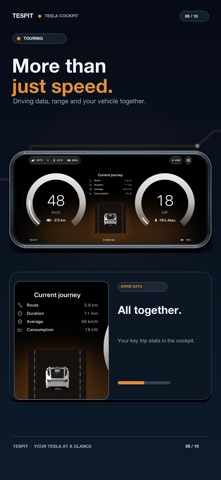
Trip data and electricity costs
• Optionally record trips locally with route, speed, battery and estimated consumption; a dedicated tab in Settings.
• Share trip images with a dark map and key figures; PDF and Excel remain available.
• Enter charging-session prices to calculate trip costs, optionally with daily exchange rates for charging abroad.
Speed in a small window
Picture in Picture under Settings › Navigation shows your speed outside Tespit, during a call for example.
Saver for older iPhones
Saver polls as fast as Adaptive, disables Liquid Glass and hides 3D except in Performance. Enabled automatically on iPhone XR through iPhone 13. Select under Settings › Navigation › Refresh Mode.
Vehicle data and charging log
More charging, tire, climate, vehicle and software details, a local charging log, charging and preconditioning schedules. Toggle climate preconditioning while parked; details hide after three seconds without interaction. Initially in Standard without the full-screen map.
Driving sounds
Eight optional profiles in Minimal respond to speed and power, with a preview and off by default. Audio, engine revs and gear changes are simulated in the app.
Route-based guidance
Apple Maps in developer mode: route-based arrows, instructions in the app language and a preview of nearby following maneuvers. The existing guidance remains selectable.
Further improvements
More stable Bluetooth transfer, faster door updates when stopped and pulling away, smoother scrolling and correct Chinese terms for live driving data and navigation minutes.
Released Jul 2, 2026. Current version shipped Oct 15, 2026.
Store description
Turn your iPhone or iPad into a speedometer and a modern vehicle dashboard for your Tesla—right in your line of sight and without installing an additional display.
Tespit connects locally to supported Tesla vehicles via Bluetooth and presents your speed, battery level, range, navigation, and other vehicle data in a clear and customizable cockpit.
YOUR TESLA SPEEDOMETER IN YOUR LINE OF SIGHT
• Speed clearly readable at all times
• Live power, battery level, and range information
• No additional aftermarket display required
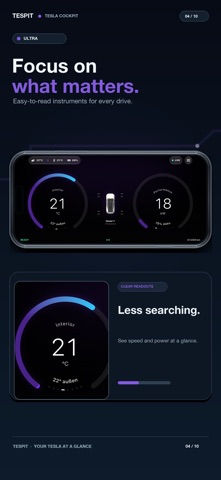
• Multiple cockpit layouts for everyday driving, navigation, and long-distance trips
• Optimized for iPhone, iPad, portrait, and landscape orientation
YOUR COCKPIT, YOUR DESIGN
Customize Tespit to match your personal style and driving situation:
• Individually configurable colors
• Different instruments and information modules
• Multiple modern cockpit designs
• Customizable arrangement of displayed information
• Media information and playback status
• Additional Premium layouts available as an option
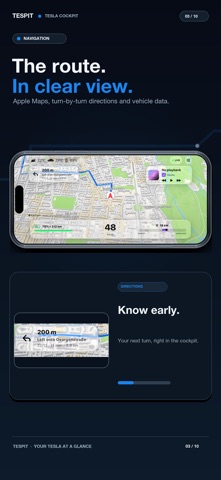
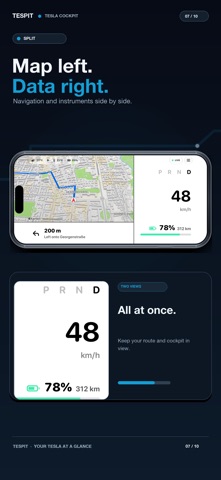
NAVIGATION DIRECTLY IN YOUR DASHBOARD
Keep your route in view without constantly switching between different apps:
• Map and route view powered by Apple Maps or, optionally, Google Maps
• Clear navigation instructions inside the cockpit
• Navigation combined with important vehicle information
VEHICLE DATA AT A GLANCE
Depending on your vehicle and the available data, Tespit may display information including:
• Speed
• Battery level and estimated range
• Power and energy consumption
• Tire pressure
• Interior and exterior temperature
• Odometer reading
• Vehicle profile, color, and connection status
LOCAL CONNECTION AND PRIVACY
Your vehicle data belongs to you:
• Local Bluetooth connection to your vehicle
• No separate Tespit user account required
• No Tespit developer backend for your vehicle connection
• Private vehicle keys remain stored locally in the protected iOS Keychain
• No advertising
• No tracking by Tespit
START FOR FREE
The core dashboard features can be used free of charge. Optional Premium features and additional cockpit layouts are available through in-app purchases or subscriptions.
Payments, renewals, and subscription management are handled securely through Apple.
IMPORTANT NOTICE
Tespit is an independent and unofficial application. It is not operated, sponsored, reviewed, or supported by Tesla, Inc.
The app does not replace the vehicle’s original displays, warnings, or safety systems. Securely mount your device and only use the app when it is safe and permitted under local laws and regulations.
GOOGLE MAPS AND PRIVACY
Apple Maps remains the default. If you optionally use Google Maps or Google Routes, Google processes the location, device and usage data required for maps and routing. Tespit runs no backend for this data; its developer cannot view individual location, map or route data. The data listed in the App Store privacy label relates exclusively to the integrated Google services. Tespit does not use this data for advertising or tracking.
Tespit Privacy Policy: https://tespitapp.com/en/datenschutz
Google Privacy Policy: https://policies.google.com/privacy
Terms of Use (EULA):
https://www.apple.com/legal/internet-services/itunes/dev/stdeula/
See this store page in another country
Prices, ranks and reviews are per country. Revenue above is already worldwide.