← Back to charts
Tempo - Screen Time icon
APP STORE

Tempo - Screen Time

Aiden Magarian · Health & Fitness · United States store
NOT IN TOP 100 HERE
View on App Store ↗
Revenue a month, worldwide
Too small to estimate
Not enough chart or ratings data
New ratings
Tracking
Daily counts start building from today
Rating
5.0 of 5
1 ratings in this store
Countries it ranks in
0
was 0 on Oct 14, 2026

Revenue

Estimated from the grossing charts of Oct 21, 2026 in the 53 countries we track, and ratings growth on the App Store.

EST. REVENUE / MONTH · WORLDWIDE
Unranked
Not in any grossing chart, and it sells nothing in the store (no in-app purchases, free download). Any revenue comes from ads or payments outside the store, which we can't see.
EST. LIFETIME DOWNLOADS
35 to 100
Estimated from ratings count
RATINGS
1
AVG RATING
5.00
PRICE
Free
AGE
135d
LAST UPDATE
41d ago
VERSION
1.0.3
SIZE
4 MB
AGE RATING
4+

Last 28 days

From our daily snapshots of every grossing chart.

DAYS IN A GROSSING CHART
0 / 28
COUNTRIES NOW
0 (was 0)
EST. REVENUE FROM CHARTS, DAILY · APP STORE ONLY EST
Show daily values
Sep 24, 2026not in a grossing chart
Sep 25, 2026not in a grossing chart
Sep 26, 2026not in a grossing chart
Sep 27, 2026not in a grossing chart
Sep 28, 2026not in a grossing chart
Sep 29, 2026not in a grossing chart
Sep 30, 2026not in a grossing chart
Oct 1, 2026not in a grossing chart
Oct 2, 2026not in a grossing chart
Oct 3, 2026not in a grossing chart
Oct 4, 2026not in a grossing chart
Oct 5, 2026not in a grossing chart
Oct 6, 2026not in a grossing chart
Oct 7, 2026not in a grossing chart
Oct 8, 2026not in a grossing chart
Oct 9, 2026not in a grossing chart
Oct 10, 2026not in a grossing chart
Oct 11, 2026not in a grossing chart
Oct 12, 2026not in a grossing chart
Oct 13, 2026not in a grossing chart
Oct 14, 2026not in a grossing chart
Oct 15, 2026not in a grossing chart
Oct 16, 2026not in a grossing chart
Oct 17, 2026not in a grossing chart
Oct 18, 2026not in a grossing chart
Oct 19, 2026not in a grossing chart
Oct 20, 2026not in a grossing chart
Oct 21, 2026not in a grossing chart
Best rank Sep 24, 2026: not ranked. Now: not ranked. Days at zero are days outside every grossing chart.

Money and momentum

Measured from the store, not estimated.

WHAT IT CHARGES
No in-app purchases
Earns from its upfront price, ads or payments outside the store.
REVIEW MOMENTUM
Too few reviews
Fewer than 3 recent written reviews in this country.
RELEASE CADENCE
3 updates in 90 days
  • Typical gap between releases7 days
From the last 4 versions listed on the App Store.
RATING BREAKDOWN
1 ratings
5★100%
4★0%
3★0%
2★0%
1★0%

What users say

Latest reviews, United States App Store.

★★★★★Oct 16, 2026
Perfect for balanced usage

Simple, beautiful app and extremely effective method - I feel much more intentional with my engagement across apps I want/need, knowing time is windowed, without getting the frustration over constantly wanting to unblock my guardrails

Store screenshots

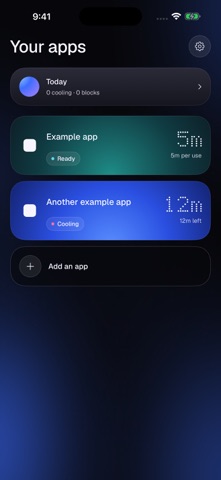
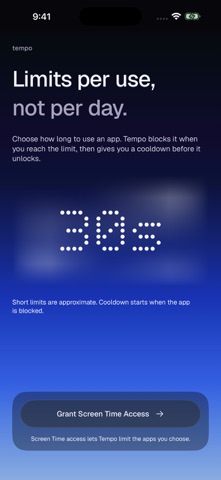
ScreenshotScreenshotScreenshot

App Store ads

Apple Search Ads this app ran in the last 90 days, from Apple's public ad repository.

Apple's ad repository couldn't be reached right now. Try again later.

Growth research

Where this app is buying and earning its users. Each link opens pre filtered.

ASO keywords

Most repeated terms in the listing. Highlighted ones also appear in the title.

tempo4set4usage4limit4choose want3set usage3usage limit3screen time3limits3choose3cooldown3keep2short2want2check2screen2time2session2

What's new in 1.0.3

A calmer, redesigned Tempo. • New interface with softly breathing blue edge light. • Clearer app settings and easier-to-drag duration controls. • Haptic feedback when changing time limits and cooldowns. • A new open-arc app icon. • Reliability improvements and accessibility refinements.

Released Jun 9, 2026. Current version shipped Sep 10, 2026.

Store description

Tempo helps you keep app sessions short with per-use limits and cooldowns. Choose the apps you want to keep in check, set a usage limit for each one, and choose how long to pause after reaching that limit. Tempo uses Apple's Screen Time system to block the app during its cooldown. HOW IT WORKS - Choose the apps you want to limit. - Set a usage limit, from seconds to minutes. - Set a cooldown before another session. - Adjust your settings whenever you need to. A CALMER WAY TO CHECK IN A simple interface, clear duration controls and gently breathing blue light help you set limits without adding more distraction. Screen Time reports usage to Tempo, so short limits are approximate and blocking may be delayed. Brief switches between apps may remain part of the same session. Cooldown starts when the app is blocked. PRIVATE BY DESIGN Your usage information stays on your device. No accounts, advertising or tracking. Tempo is for limiting your own apps on your own iPhone.

See this store page in another country

Prices, ranks and reviews are per country. Revenue above is already worldwide.

More from Aiden Magarian

2AM CAM
Photo & Video
31 ratingsAnalyze →
Parse – Split the Bill
Utilities
1 ratingsAnalyze →