ASO keywords
Most repeated terms in the listing. Highlighted ones also appear in the title.
brim8pay automation5ask siri5right4bank4never4once4screen4pay4tap4ask4category4bank connection3home screen3set pay3screen widgets3spend3left3bills3ever3number3set3add3recurring3
What's new in 1.4.0
Brim is ready for iPad and iPhone Duo.
Your budget fills the big screen, and insights open right beside it.
We reworked the look and feel of transactions to make them cleaner. Swipe left on a transaction to delete it, or on a planned one to process it now. Deleting in bulk is easier too: tap Select, pick as many as you like, and delete them all at once.
- Lazare
Released Jan 24, 2026. Current version shipped Oct 4, 2026.
Store description
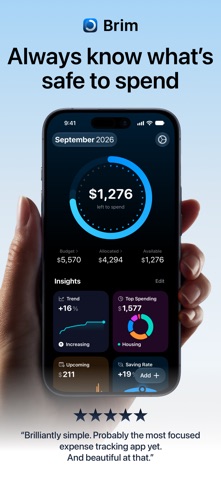
What's safe to spend right now?
Not your bank balance. What's left after bills, subscriptions, and savings - before the next payday. No bank connection required. Ever.
No account. No sign-in. Brim shows you one honest number, and it never leaves your iPhone.
SET UP ONCE. KNOW EVERY DAY.
Add your bills, subscriptions, and recurring expenses once. Brim deducts them automatically - that number on your home screen is what's actually yours to spend.
No mental math. No guessing before you spend.
NO BANK CONNECTION. STILL AUTOMATIC.
Brim never connects to your bank. Set up an Apple Pay automation once, and every tap to pay logs itself as an expense - no manual entry, ever.
BUILT FOR REAL LIFE
Salary on the 29th. Freelance month. Two paychecks at different times. Brim plans on what you actually expect to earn, and adjusts as reality unfolds.
ASK SIRI AI
Ask Siri what's left in your budget, or for any category, like "Ask Brim what I have left for Coffee Shops." Ask Siri to add a transaction, hands free.
Search your transactions right from Spotlight.
UNDERSTAND YOUR MONEY, AT A GLANCE
Six charts, each with one job.
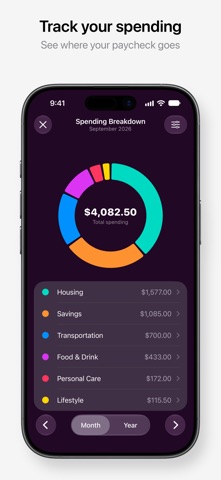
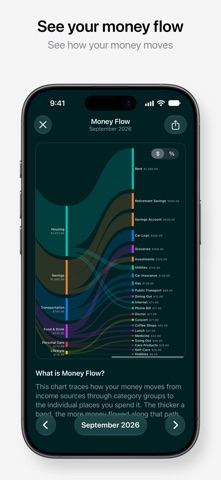
• Spending Breakdown - watch your paycheck flow from income to every category
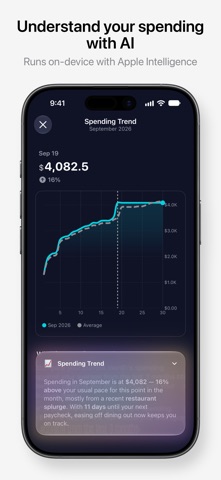
• Spending Trend - is this month better or worse than your usual?
• Top Spending - which categories are absorbing the most?
• Saving Rate - are you on track? Benchmarks included, not a vague thumbs-up
Tap any chart. Apple Intelligence tells you what it means, in one sentence, on your device.
ONE TAP TO ADD AN EXPENSE
Tap once inside the app. Pick a category. Done.
Or set up an Apple Pay automation in iOS Shortcuts and let your purchases log themselves. Whichever feels less like work.
Brim also suggests the right emoji when you create a new category - small touch, but it makes the app feel like yours.
WORKS WHILE YOU'RE NOT LOOKING
• 8 Home Screen widgets, plus Lock Screen widgets
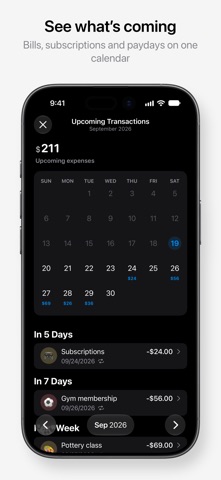
• Browse what's ahead in the new Upcoming calendar
• A reminder before a recurring payment goes out
• Apple Pay automation via Shortcuts
• Recurring bills auto-deducted every month
PRIVATE BY DESIGN. NO SIGN-IN, EVER.
Open Brim and start. No account to create, no email, no password. Your financial data lives on your device. iCloud sync goes through your personal account - we never see it. The AI features run on-device too - your transactions never leave your iPhone.
BUILT TO BE FAST
Opens instantly. No loading screen. Just your number, right there.
Logging an expense on the go takes three seconds. That's the whole point.
DATA YOU OWN
• CSV import from other budget apps
• CSV export anytime
• 180+ currencies supported
BUILT WITH YOU
Made by one indie developer who uses Brim every day. Vote on the roadmap, email feedback, help shape what comes next.
- Lazare
Privacy: https://getbrim.app/privacy
Terms: https://getbrim.app/terms
See this store page in another country
Prices, ranks and reviews are per country. Revenue above is already worldwide.