← Back to charts
Edits: ビデオ編集者 icon
APP STORE

Edits: ビデオ編集者

Instagram, Inc. · Photo & Video · Japan store
NOT IN TOP 100 HERE
View on App Store ↗ Google Play version →

Revenue

Estimated from today's grossing charts in the 53 countries we track, and ratings growth on the App Store.

EST. REVENUE / MONTH · WORLDWIDE
Unranked
Not in any grossing chart, and it sells nothing in the store (no in-app purchases, free download). Any revenue comes from ads or payments outside the store, which we can't see.
EST. LIFETIME DOWNLOADS
759.1K to 2.2M
Estimated from ratings count
RATINGS
21.7K
AVG RATING
4.57
PRICE
無料
AGE
1.5y
LAST UPDATE
2d ago
VERSION
452.0
SIZE
325 MB
AGE RATING
4+

Last 28 days

From our daily snapshots of every grossing chart and daily ratings counts.

DAYS IN A GROSSING CHART
0 / 28
COUNTRIES NOW
0 (was 0)
NEW RATINGS, LAST 7 DAYS
+12.1K
EST. REVENUE FROM CHARTS, DAILY · APP STORE ONLY EST
Show daily values
Sep 24, 2026not in a grossing chart
Sep 25, 2026not in a grossing chart
Sep 26, 2026not in a grossing chart
Sep 27, 2026not in a grossing chart
Sep 28, 2026not in a grossing chart
Sep 29, 2026not in a grossing chart
Sep 30, 2026not in a grossing chart
Oct 1, 2026not in a grossing chart
Oct 2, 2026not in a grossing chart
Oct 3, 2026not in a grossing chart
Oct 4, 2026not in a grossing chart
Oct 5, 2026not in a grossing chart
Oct 6, 2026not in a grossing chart
Oct 7, 2026not in a grossing chart
Oct 8, 2026not in a grossing chart
Oct 9, 2026not in a grossing chart
Oct 10, 2026not in a grossing chart
Oct 11, 2026not in a grossing chart
Oct 12, 2026not in a grossing chart
Oct 13, 2026not in a grossing chart
Oct 14, 2026not in a grossing chart
Oct 15, 2026not in a grossing chart
Oct 16, 2026not in a grossing chart
Oct 17, 2026not in a grossing chart
Oct 18, 2026not in a grossing chart
Oct 19, 2026not in a grossing chart
Oct 20, 2026not in a grossing chart
Oct 21, 2026not in a grossing chart
Best rank Sep 24, 2026: not ranked. Now: not ranked. Days at zero are days outside every grossing chart.
RATINGS IN THE CORE COUNTRIES, DAILY
Show daily values
Oct 13, 2026413.9K ratings
Oct 14, 2026415.3K ratings
Oct 15, 2026417.3K ratings
Oct 16, 2026417.8K ratings
Oct 17, 2026420.4K ratings
Oct 18, 2026422.1K ratings
Oct 19, 2026424.1K ratings
Oct 20, 2026425.4K ratings
Oct 21, 2026427.4K ratings
413.9K on Oct 13, 2026, 427.4K on Oct 21, 2026. New ratings track new downloads, even outside the charts.

Money and momentum

Measured from the store, not estimated.

WHAT IT CHARGES
No in-app purchases
Earns from its upfront price, ads or payments outside the store.
REVIEW MOMENTUM
Too few reviews
Fewer than 3 recent written reviews in this country.
RELEASE CADENCE
16 updates in 90 days
  • Typical gap between releases6 days
From the last 25 versions listed on the App Store.
RATING BREAKDOWN
21.7K ratings
5★78%
4★11%
3★6%
2★2%
1★4%

Store screenshots

ScreenshotScreenshotScreenshotScreenshotScreenshotScreenshotScreenshotScreenshot

App Store ads

Apple Search Ads this app ran in the last 90 days, from Apple's public ad repository.

Apple's ad repository couldn't be reached right now. Try again later.

Growth research

Where this app is buying and earning its users. Each link opens pre filtered.

ASO keywords

Most repeated terms in the listing. Highlighted ones also appear in the title.

edits edits5edits4instagram3meta2

What's new in 452.0

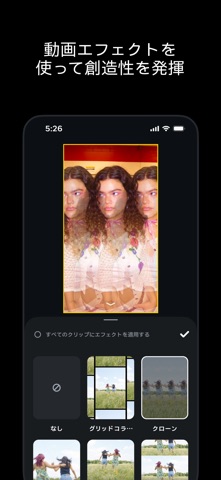
写真の新しいキャンバス。さらに、50以上の新しいエフェクトが登場します。 • カルーセル。複数のスライドを使ったキャンバスで写真や動画を組み合わせたり、テキストやレイアウトを追加したりできます。 • インアニメーションやアウトアニメーションなど、50以上の新しい動画エフェクトが追加されました。 • キット。色、テキストスタイル、キャプションスタイル、音声を1つのセットとして保存して、再利用しましょう。 • 人気のトピック。フォロワーの興味を把握しましょう。フォロワー数が1万人を超えるアカウント向けです。 • オーディオリンク。リール動画のトラックに視聴者を誘導できます。

Released Apr 22, 2025. Current version shipped Oct 19, 2026.

Store description

Instagramの新しい動画作成アプリEditsを使って、自信を持ってシェアできる動画を作成しましょう。 Editsは無料の動画エディターです。Editsを使えば、クリエイターはスマートフォンで簡単にアイデアを動画に変えることができます。Editsには、作成プロセスをサポートするために必要なツールがすべてそろっています。 動画の作成やシェアがシンプルに • 透かしが含まれない動画を4Kでエクスポートして、あらゆるプラットフォームでシェアできます。 • すべての下書きと動画を1か所で管理できます。 • 高品質なクリップを最長10分間キャプチャして、すぐに編集を始められます。 • 高画質で再生できる動画をInstagramに簡単にシェアできます。 強力なツールで作成、編集 • シングルフレームの精度で動画を編集できます。 • 解像度、フレームレート、ダイナミックレンジのカメラ設定に加え、アップグレードされたフラッシュとズームのコントロールで、思いどおりに仕上げることができます。 • AIアニメーションの機能を使って画像を動画に変換できます。 • グリーンバックを使って背景を変えたり、切り抜いたり、動画オーバーレイを追加したりできます。 • さまざまなフォント、サウンドエフェクトやボイスエフェクト、動画フィルター、動画エフェクト、スタンプなどから選択できます。 • 音声エンハンスで音声をクリアにし、バックグラウンドノイズを除去できます。 • キャプションを自動生成して、動画にどのように表示するかをカスタマイズできます。 次のクリエイティブ作成に情報を活かす • トレンド中の音源が使われているリール動画からインスピレーションが得られます。 • 「これは!」と思ったアイデアやコンテンツを、自分が作成に取りかかるまでキープしておくことができます。 • ライブのインサイトダッシュボードでリール動画のパフォーマンスをトラッキングできます。 • リール動画のエンゲージメントに影響する要素を把握できます。 Meta Terms: https://www.facebook.com/terms.php Meta Privacy Policy: https://privacycenter.instagram.com/policy

See this store page in another country

Prices, ranks and reviews are per country. Revenue above is already worldwide.