← Back to charts
Framous: Screenshot Frames icon
APP STORE

Framous: Screenshot Frames

Dark Noise LLC · Developer Tools · Germany store
NOT IN TOP 100 HERE
View on App Store ↗
Revenue a month, worldwide
Too small to estimate
Not enough chart or ratings data
New ratings
Tracking
Daily counts start building from today
Rating
0.0 of 5
0 ratings in this store
Countries it ranks in
0
was 0 on Oct 15, 2026

Revenue

Estimated from the grossing charts of Oct 21, 2026 in the 53 countries we track, and ratings growth on the App Store.

EST. REVENUE / MONTH · WORLDWIDE
Unranked
Not in any grossing chart, and it sells nothing in the store (no in-app purchases, free download). Any revenue comes from ads or payments outside the store, which we can't see.
EST. LIFETIME DOWNLOADS
n/a
Estimated from ratings count
RATINGS
0
AVG RATING
n/a
PRICE
Gratis
AGE
1.7y
LAST UPDATE
36d ago
VERSION
2.0.1
SIZE
94 MB
AGE RATING
4+

Last 29 days

From our daily snapshots of every grossing chart.

DAYS IN A GROSSING CHART
0 / 29
COUNTRIES NOW
0 (was 0)
EST. REVENUE FROM CHARTS, DAILY · APP STORE ONLY EST
Show daily values
Sep 24, 2026not in a grossing chart
Sep 25, 2026not in a grossing chart
Sep 26, 2026not in a grossing chart
Sep 27, 2026not in a grossing chart
Sep 28, 2026not in a grossing chart
Sep 29, 2026not in a grossing chart
Sep 30, 2026not in a grossing chart
Oct 1, 2026not in a grossing chart
Oct 2, 2026not in a grossing chart
Oct 3, 2026not in a grossing chart
Oct 4, 2026not in a grossing chart
Oct 5, 2026not in a grossing chart
Oct 6, 2026not in a grossing chart
Oct 7, 2026not in a grossing chart
Oct 8, 2026not in a grossing chart
Oct 9, 2026not in a grossing chart
Oct 10, 2026not in a grossing chart
Oct 11, 2026not in a grossing chart
Oct 12, 2026not in a grossing chart
Oct 13, 2026not in a grossing chart
Oct 14, 2026not in a grossing chart
Oct 15, 2026not in a grossing chart
Oct 16, 2026not in a grossing chart
Oct 17, 2026not in a grossing chart
Oct 18, 2026not in a grossing chart
Oct 19, 2026not in a grossing chart
Oct 20, 2026not in a grossing chart
Oct 21, 2026not in a grossing chart
Oct 22, 2026not in a grossing chart
Best rank Sep 24, 2026: not ranked. Now: not ranked. Days at zero are days outside every grossing chart.

Money and momentum

Measured from the store, not estimated.

WHAT IT CHARGES
No in-app purchases
Earns from its upfront price, ads or payments outside the store.
REVIEW MOMENTUM
0.0 reviews / week
  • Recent reviews average4.3 stars
  • Recent 1 and 2 star share0%
From the latest 3 written reviews, covering 544 days.
RELEASE CADENCE
2 updates in 90 days
  • Typical gap between releases21 days
From the last 10 versions listed on the App Store.

What users say

Latest reviews, Germany App Store.

★★★★★Oct 24, 2025
Super - bin begeistert!

Sehr einfach zu bedienen. Ich erstelle mit meinem iPhone oder iPad Bildschirmaufnahmen, ziehe diese von Fotos direkt in die App und kann dann das fertige Bild exportieren. Einfacher geht es nicht, einfach nur TOP!

★★★★★Sep 14, 2025
Basics good, but room for improvements!

The Basics don by this Software are nice. Clean and easy handling. When I make more than one screenshot, it is annoying, that all settings have to be set again. You cannot replace a screenshot to keep settings. Settings cannot be saved. No annotations like an arrow, rectangle or explaining text.

★★★★★Apr 26, 2025
I’ve been searching for something like this!

Thank you so much! In the past I’ve been using bad alternatives and never been this happy. This works so good, and you can see that there is so much engineering and love in the details. Thank you! <3

Store screenshots

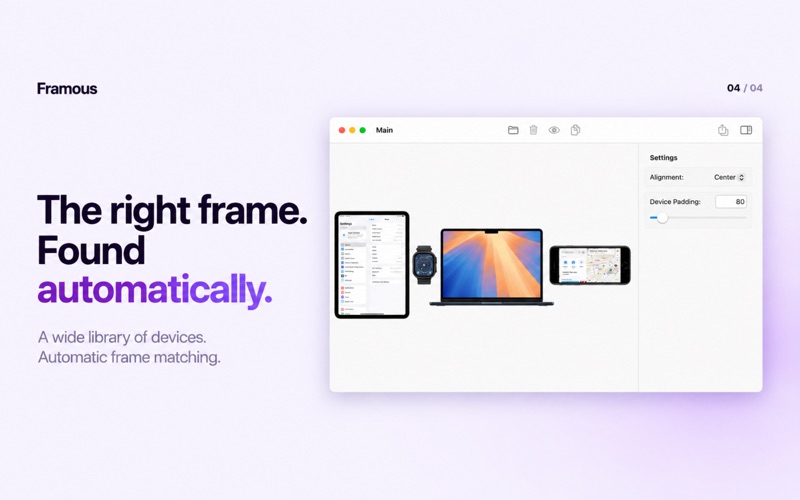
ScreenshotScreenshotScreenshotScreenshot

App Store ads

Apple Search Ads this app ran in the last 90 days, from Apple's public ad repository.

Apple's ad repository couldn't be reached right now. Try again later.

Growth research

Where this app is buying and earning its users. Each link opens pre filtered.

ASO keywords

Most repeated terms in the listing. Highlighted ones also appear in the title.

add5screen recordings5device4screenshots4device frames3frames around3screenshots screen3shortcuts support3video editor3add tap3tap swipe3swipe indicators3recordings add3frames3screen3recordings3video3framous2around2shortcuts2support2automate2framing2editor2

What's new in 2.0.1

Framous 2.0.1 is a minor release with a few new additions: * New "iPhone Duo — Book" frame that allows you to fold the device and your screenshots at various angles * Duplicate tap and swipe indicators from the right click menu * Fixed bug preventing setting values higher than the slider maximum Framous 2.0 is our biggest update to date with support for video, a new CLI, new iPhone 18 & iPhone Duo frames, and macOS 27 support. - You can now add frames around your screen recordings. - This includes support for shadows, backgrounds, and a customizable mask for the red dot. - You can also add tap and swipe indicators with the video editor. - Give framing powers to your AI agents with the new Framous CLI! - Just copy and paste the prompt from the new CLI guide in settings and set your agent to work - Wrap your screenshots in the most up to date frames from Apple including - iPhone Duo (in opened and closed form) - iPhone 18 Pro & Pro Max

Released Feb 25, 2025. Current version shipped Sep 15, 2026.

Store description

Framous is the easiest way to quickly add device frames around your screenshots and screen recordings! Drag and drop or copy and paste to throw your screenshots in and yank them back out perfectly set into device frames to make them look great. And with Shortcuts support you can even automate the process to make framing your screenshots even easier! With the video editor, you can add tap and swipe indicators to help make clear how the user is interacting with the device. Features: - Auto-detect your device based on your screenshot or video to pick the right frame from a growing library of devices - Combine multiple devices into a single image, or bulk export multiple separate images at once - Quick customization options to change frame colors and more - Add custom backgrounds, shadows, and rounded corners to your screenshots and screen recordings - Add frames around your screen recordings and add tap and swipe indicators in the video editor - Automate your screenshot framing with Shortcuts support for even more efficient workflows - Let AI agents do the work for you with the Framous CLI For in-app purchases and subscription terms, see https://www.apple.com/legal/internet-services/itunes/dev/stdeula/

See this store page in another country

Prices, ranks and reviews are per country. Revenue above is already worldwide.

More from Dark Noise LLC

Overviewer
Education
155 ratingsAnalyze →
Dark Noise: Ambient Sounds
Health & Fitness
276 ratingsAnalyze →
Spatial Noise: White Sounds
Health & Fitness
0 ratingsAnalyze →
Level Headed: Line Tool
Utilities
0 ratingsAnalyze →