← Back to charts
YouTube Create: Video-Editor icon
APP STORE

YouTube Create: Video-Editor

Google · Photo & Video · Germany store
NOT IN TOP 100 HERE
View on App Store ↗ Google Play version →
Revenue a month, worldwide
Too small to estimate
Not enough chart or ratings data
New ratings
Tracking
Daily counts start building from today
Rating
4.1 of 5
42 ratings in this store
Countries it ranks in
0
was 0 on Oct 14, 2026

Revenue

Estimated from the grossing charts of Oct 21, 2026 in the 53 countries we track, and ratings growth on the App Store.

EST. REVENUE / MONTH · WORLDWIDE
Unranked
Not in any grossing chart, and it sells nothing in the store (no in-app purchases, free download). Any revenue comes from ads or payments outside the store, which we can't see.
EST. LIFETIME DOWNLOADS
1.5K to 4.2K
Estimated from ratings count
RATINGS
42
AVG RATING
4.07
PRICE
Gratis
AGE
313d
LAST UPDATE
6d ago
VERSION
0.147.945
SIZE
240 MB
AGE RATING
4+

Last 28 days

From our daily snapshots of every grossing chart.

DAYS IN A GROSSING CHART
0 / 28
COUNTRIES NOW
0 (was 0)
EST. REVENUE FROM CHARTS, DAILY · BOTH STORES ONLY EST
Show daily values
Sep 24, 2026not in a grossing chart
Sep 25, 2026not in a grossing chart
Sep 26, 2026not in a grossing chart
Sep 27, 2026not in a grossing chart
Sep 28, 2026not in a grossing chart
Sep 29, 2026not in a grossing chart
Sep 30, 2026not in a grossing chart
Oct 1, 2026not in a grossing chart
Oct 2, 2026not in a grossing chart
Oct 3, 2026not in a grossing chart
Oct 4, 2026not in a grossing chart
Oct 5, 2026not in a grossing chart
Oct 6, 2026not in a grossing chart
Oct 7, 2026not in a grossing chart
Oct 8, 2026not in a grossing chart
Oct 9, 2026not in a grossing chart
Oct 10, 2026not in a grossing chart
Oct 11, 2026not in a grossing chart
Oct 12, 2026not in a grossing chart
Oct 13, 2026not in a grossing chart
Oct 14, 2026not in a grossing chart
Oct 15, 2026not in a grossing chart
Oct 16, 2026not in a grossing chart
Oct 17, 2026not in a grossing chart
Oct 18, 2026not in a grossing chart
Oct 19, 2026not in a grossing chart
Oct 20, 2026not in a grossing chart
Oct 21, 2026not in a grossing chart
Best rank Sep 24, 2026: not ranked. Now: not ranked. Days at zero are days outside every grossing chart.

Money and momentum

Measured from the store, not estimated.

WHAT IT CHARGES
No in-app purchases
Earns from its upfront price, ads or payments outside the store.
REVIEW MOMENTUM
0.3 reviews / week
  • Recent reviews average3.1 stars
  • Recent 1 and 2 star share47%
From the latest 15 written reviews, covering 310 days.
RELEASE CADENCE
14 updates in 90 days
  • Typical gap between releases7 days
From the last 25 versions listed on the App Store.
RATING BREAKDOWN
42 ratings
5★69%
4★7%
3★0%
2★10%
1★14%

What users say

Latest reviews, Germany App Store.

★★★★★Oct 17, 2026
Gute app, aber die Qualität der Videos…

Auch wenn Lizenzierte Lieder nur 15 sec gehen dürfen, finde ich das es eine sehr gute App ist! Was mich an der App aber ein bisschen stört ist das wenn man das Video importiert, die Qualität schlechter wird. Aber sonst ist es eine sehr gute App und kann es nur weiter empfehlen!

★★★★★Sep 16, 2026
app Crashing

crashing while editing,exploring,cant even save the video in library.pls fix

★★★★★Sep 15, 2026
Gut zu bedienen, aber wenig Content

Ich finde die App YouTube Create schon ganz okay. Die Bedienung ist recht intuitiv und man kann von null auf eigene Videos erstellen. Das beinhaltet den Schnitt das hinzufügen von einer Hintergrundmusik und Übergänge einstellen. Was mir jedoch für kurze Urlaubsclips fehlt, sind einfach eine größere Auswahl an Templates. Bisher gibt es hauptsächlich Templates für YouTube Shorts. Ich hätte gerne 16:9 Templates.

★★★★★Aug 18, 2026
Best apo

Best app for those who cannot us rpaid apps

★★★★★Jul 5, 2026
Nervt

Hängt sich beim Export auf. videos teils nach Export leicht verschwommen. Bereits in der Foto Galerie zugeschnittene Videos werden un zugeschnitten importiert keine möglich Videos zu zuschneiden. Nach Export Videos teilweise nicht zu sehen, nur ton zu hören und blacksceen. Ton passt teils nicht mehr zum bild

★★★★★Jun 4, 2026
Schrot pur

Diese App ist der größte Schrot wo es gibt ich dachte mir komm ich versuche es mal ob’s klappt aber ich muss feststellen das ist der größte rotz von der App ich verstehe das nicht das man so was machen kann viralen weil es ja Google ist und dann so ein App raus zu bringen wo nichts taugt ich kann die App überhaupt nicht empfehlen und wenn ihr CapCut die Konkurrenz sein möchtet nah dann viel Spaß weil so wie die die App ist habt ihr null Chancen gegen CapCut

Store screenshots

ScreenshotScreenshotScreenshotScreenshotScreenshotScreenshotScreenshotScreenshotScreenshotScreenshot

App Store ads

Apple Search Ads this app ran in the last 90 days, from Apple's public ad repository.

No App Store ads in the EU
None in the last 90 days.

Apple only publishes ads shown in the EU (EU Digital Services Act), with a 7 day delay. An app that advertises only outside the EU shows nothing here.

Growth research

Where this app is buying and earning its users. Each link opens pre filtered.

ASO keywords

Most repeated terms in the listing. Highlighted ones also appear in the title.

mit20und20videos17aus7der6youtube5kannst5deinen videos5videos mit5von youtube5hinzuf gen5mehr4deinen4von4erstellen4die4deinem4oder4aus deinen3youtube create3automatische untertitel3deinem publikum3ganz einfach3mehr als3

What's new in 0.147.945

YouTube Create ist auf dem iPhone XR und neueren iPhones mit iOS 17 oder höher verfügbar. Wir möchten YouTube Create weiter verbessern und arbeiten deshalb kontinuierlich an neuen Funktionen.

Released Dec 13, 2025. Current version shipped Oct 15, 2026.

Store description

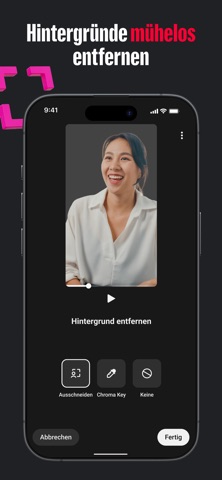
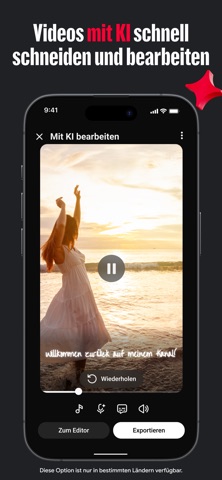
Mach mehr aus deinen Videos mit YouTube Create – der offiziellen App von YouTube zum Erstellen und Bearbeiten von Videos. Du kannst Filter und Effekte, Musik, Voiceovers sowie automatische Untertitel hinzufügen und viele weitere Funktionen nutzen. So erstellst du ansprechende Videos, die deinem Publikum gefallen werden – ohne Zeit mit komplizierten Bearbeitungstools zu verschwenden. ALLE WICHTIGEN FUNKTIONEN FÜR DIE BEARBEITUNG ● Videos, Fotos und Audioinhalte ganz einfach an einem Ort zusammenführen ● Videoclips zuschneiden, kürzen und teilbare Clips aus deinen Videos erstellen ● Aus mehr als 40 verschiedenen Übergängen wählen, um Clips elegant zu verbinden ● Videos beschleunigen oder verlangsamen PROZESSE MIT LEISTUNGSSTARKEN TOOLS VEREINFACHEN ● Mit dem Tool „Mit KI bearbeiten“ kannst du aus deinem Rohmaterial einen hochwertigen ersten Entwurf erstellen* ● Automatische Untertitel oder automatisch übersetzte Untertitel mit nur einmal tippen hinzufügen (verfügbar in ausgewählten Sprachen) ● Du kannst dein Material mit einer unserer integrierten, anpassbaren Vorlagen individuell anordnen ● Mit der Funktion „Ausschneiden“ oder „Chroma Key“ kannst du den Hintergrund deines Videos entfernen VIDEOS MIT MUSIK UND HOCHWERTIGEM AUDIO VERBESSERN ● Mit Tausenden lizenzfrei nutzbaren Songs und Soundeffekten aus der Musikmediathek von YouTube Shorts kannst du deinen Videos das gewisse Etwas verleihen ● Videoclips über die Beat-Matching-Funktion mit ausgewählten Songs synchronisieren – dein Soundtrack gibt den Takt an ● Voiceovers direkt in der App aufnehmen und Videos so noch einfacher kommentieren ● Störende Hintergrundgeräusche mit dem Audio-Clean-up-Tool von YouTube Create gezielt reduzieren KREATIVITÄT MIT KI – MEHR ALS DEINE KAMERA KANN ● Neue Videos mit Prompts und Referenzbildern erstellen* ● Mit Prompts und Referenzbildern neue Bilder generieren* ● KI-Videos remixen und ihnen eigene Akzente Note verleihen* MIT FILTERN UND EFFEKTEN AUFFALLEN ● Farbe eines Videos durch Veränderung der Sättigung, Helligkeit, Belichtung, des Farbtons und mehr anpassen ● Mit benutzerdefinierten Filtern besondere Stimmungen erzeugen ● Wähle aus über 60 Effekten, um deine Videos ansprechender zu gestalten KREATIV WERDEN MIT STICKERN UND SCHRIFTARTEN ● Aus hunderten Schriftarten und animierten Texteffekten wählen und deiner Kreativität freien Lauf lassen ● Sticker, GIFs und Emojis hinzufügen, die perfekt zu deinem Stil passen FÜR ALLE FORMATE GEEIGNET ● Größe der Videos an unterschiedliche Seitenverhältnisse anpassen – vertikal, horizontal oder quadratisch – und im gewünschten Format teilen ● Videos können in bis zu 4K-Auflösung und mit bis zu 60 fps exportiert werden ● Videos ganz einfach direkt auf deinen YouTube-Kanal hochladen und mit deinem Publikum teilen *Diese Funktion ist nur in bestimmten Ländern verfügbar.

See this store page in another country

Prices, ranks and reviews are per country. Revenue above is already worldwide.

More from Google

Google Maps
Navigation
939.6K ratingsAnalyze →
YouTube
Photo & Video
4M ratingsAnalyze →
Google
Utilities
463.9K ratingsAnalyze →
Google Chrome
Utilities
262.1K ratingsAnalyze →
Gmail – E-Mail von Google
Productivity
104.5K ratingsAnalyze →
Google Übersetzer
Reference
12.6K ratingsAnalyze →
Google Earth
Travel
5.6K ratingsAnalyze →
Google Drive - Dateispeicher
Productivity
325.6K ratingsAnalyze →
Google Fotos
Photo & Video
66.3K ratingsAnalyze →