ASO keywords
Most repeated terms in the listing. Highlighted ones also appear in the title.
verba16video11subtitles9background noise6captions6audio6background5languages5automatically5short form5subtitles match5subtitles languages5without recording5verba digital5short4noise4match4generates4styles4presets4custom4content4tap4export4
What's new in 3.69.0
This update makes AI Editor much smarter, adds support for image-based projects and improves export stability on iOS 27.2.
SMARTER AI EDITING
AI Edit now understands your project better and supports even more creative concepts. With the new prompt mode, you can tell it exactly what you want, giving you more control over every edit while keeping the process quick and easy.
CREATE WITH IMAGES
You can now start projects using images, opening up new ways to create stories, slideshows, and eye-catching edits in Verba.
4K EXPORTS on iSO 27.2
We fixed an issue that could cause 4K exports to fail on iOS 27.2, so your high-resolution projects export more reliably.
We hope you enjoy creating with this update!
Released Jan 1, 2024. Current version shipped Oct 14, 2026.
Store description
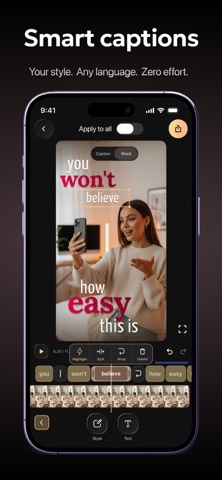
Verba is an AI-powered video editor and caption generator for short-form video creators who want to record, edit, and publish polished videos faster. Whether you're adding dynamic AI captions, cleaning up background noise, or styling subtitles to match your brand - Verba handles it all in one place.
Rated 4.9 by creators who say Verba captures audio accurately even in noisy environments, where other apps fall short.
• Dynamic AI captions - AI auto-generates, positions, and styles subtitles to match your video. 50+ presets, unlimited custom styles.
• Publish in 1080p or 4K - your content looks sharp on any platform and any screen.
• Make subtitles yours - 50+ caption presets, custom fonts, colors, animations, and gradient styles to match your brand.
• Studio-quality audio - Audio Enhancement removes background noise so your voice sounds clear and professional.
• Reach a global audience - translate your subtitles into 25+ languages with a single tap.
KEY FEATURES
Smart Captions
Verba's AI analyzes every frame of your video and automatically positions, sizes, and styles your subtitles to match the visual context - or take full control with 50+ ready-made presets, custom fonts, colors, animations, gradient text, and background options so subtitles feel like part of your brand. Now with trending presets, a liquid glass effect, and more languages.
High Resolution Export
Export every video at 1080p or 4K so your content looks sharp on any platform and any screen.
Teleprompter
Record while reading your script on screen. Scrolls at your pace, available in portrait and landscape mode. Plus dual-camera, Bluetooth remote, exposure, and white balance - shoot like a pro.
Audio Enhancement
One tap removes background noise and brings your voice to studio-quality clarity - no external mic needed.
AI Translation
Translate your subtitles into 25+ languages in one tap and reach audiences worldwide - without re-recording a single word.
AI Voiceover
Add a voice to your video without recording. Choose language, style, and pacing - Verba generates the audio and syncs it automatically.
Beat-Sync Edit
AI analyzes your audio track and cuts your footage to the beat automatically - perfect for vlog-format content without manual timeline work.
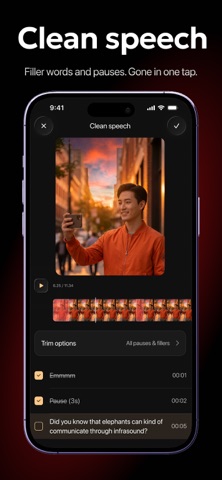
Clean Speech
Removes pauses, filler words, and dead air from your talking videos automatically - so every sentence lands clean.
AI B-Roll
Never shoot B-roll again - AI generates matching photorealistic footage the moment you say it. Regenerate any shot to get exactly what you imagined.
Pro Editor Tools
Pro-level control - masks, blurs, transparency, keyframes, animations, freeze-frame, and cinematic zoom (0.5x-10x, custom curve).
Download Verba and publish your next video today.
Q: Can Verba add captions to my video automatically?
A: Yes - drop in your video and AI generates accurate subtitles in seconds. Works reliably even with background noise or multiple speakers.
Q: Is Verba built for short-form video?
A: Yes - Verba is designed for short-form content. It handles AI captions, teleprompter, beat-sync editing, voiceover, and 4K export in one place, optimized for vertical formats.
Q: Can Verba translate my video captions into other languages?
A: Yes - AI Translation converts your subtitles into 25+ languages in one tap, so you can reach a global audience without re-recording anything.
SUBSCRIPTION
Unlock the full Verba experience - more AI tools, higher export quality, and everything you need to create faster. Start free - no commitment needed. Subscriptions auto-renew unless cancelled at least 24 hours before the end of the current period.
Privacy Policy: https://static.verba.digital/verba-privacy-policy.pdf
Terms of Use: https://static.verba.digital/verba-terms-and-conditions.pdf
Support: support@verba.digital
See this store page in another country
Prices, ranks and reviews are per country. Revenue above is already worldwide.