← Back to charts
Procreate icon
APP STORE

Procreate

Savage Interactive Pty Ltd · Graphics & Design · United Kingdom store
NOT IN TOP 100 HERE
View on App Store ↗
Revenue a month, worldwide EST
$49.1K
Likely $16.4K to $147.3K
New ratings
Tracking
Daily counts start building from today
Rating
4.4 of 5
7.7K ratings in this store
Countries it ranks in
0
was 0 on Oct 14, 2026

Revenue

Estimated from the grossing charts of Oct 21, 2026 in the 53 countries we track, and ratings growth on the App Store.

EST. REVENUE / MONTH · WORLDWIDE · FROM RATINGS GROWTH
$49.1K
Range $16.4K to $147.3K
EST. REVENUE / YEAR · WORLDWIDE
$589.1K
610 new ratings a month on average since launch
EST. LIFETIME DOWNLOADS
268.1K to 765.9K
Estimated from ratings count
WHERE ITS USERS ARE · SHARE OF RATINGS
  • United States 50.8K ratings44%
  • United Kingdom 7.7K ratings7%
  • South Korea 6.7K ratings6%
  • Canada 6.2K ratings5%
  • Australia 5.6K ratings5%
  • Germany 5K ratings4%
  • Japan 4.2K ratings4%
  • France 3.8K ratings3%
HOW SURE ARE WE
Not in any grossing chart, so this comes from ratings growth (610 new ratings a month on average since launch): about $100 a month per new rating a month. Tested on 418 apps with verified revenue: typically off by about 2 times, and big earners tend to come out low. Countries we don't track (and Google Play in China, which doesn't exist) aren't included, and neither are ads or web payments. Gross revenue before store fees.
RATINGS
7.7K
AVG RATING
4.36
PRICE
£12.99
AGE
15.6y
LAST UPDATE
34d ago
VERSION
5.4.14
SIZE
1105 MB
AGE RATING
4+

Last 28 days

From our daily snapshots of every grossing chart.

DAYS IN A GROSSING CHART
0 / 28
COUNTRIES NOW
0 (was 0)
EST. REVENUE FROM CHARTS, DAILY · APP STORE ONLY EST
Show daily values
Sep 24, 2026not in a grossing chart
Sep 25, 2026not in a grossing chart
Sep 26, 2026not in a grossing chart
Sep 27, 2026not in a grossing chart
Sep 28, 2026not in a grossing chart
Sep 29, 2026not in a grossing chart
Sep 30, 2026not in a grossing chart
Oct 1, 2026not in a grossing chart
Oct 2, 2026not in a grossing chart
Oct 3, 2026not in a grossing chart
Oct 4, 2026not in a grossing chart
Oct 5, 2026not in a grossing chart
Oct 6, 2026not in a grossing chart
Oct 7, 2026not in a grossing chart
Oct 8, 2026not in a grossing chart
Oct 9, 2026not in a grossing chart
Oct 10, 2026not in a grossing chart
Oct 11, 2026not in a grossing chart
Oct 12, 2026not in a grossing chart
Oct 13, 2026not in a grossing chart
Oct 14, 2026not in a grossing chart
Oct 15, 2026not in a grossing chart
Oct 16, 2026not in a grossing chart
Oct 17, 2026not in a grossing chart
Oct 18, 2026not in a grossing chart
Oct 19, 2026not in a grossing chart
Oct 20, 2026not in a grossing chart
Oct 21, 2026not in a grossing chart
Best rank Sep 24, 2026: not ranked. Now: not ranked. Days at zero are days outside every grossing chart.

Money and momentum

Measured from the store, not estimated.

WHAT IT CHARGES
No in-app purchases
Earns from its upfront price, ads or payments outside the store.
REVIEW MOMENTUM
3.7 reviews / week
  • Trendsteady
  • Recent reviews average3.9 stars
  • Recent 1 and 2 star share19%
From the latest 500 written reviews, covering 955 days. The store only returns this many, so this is the most recent slice.
RELEASE CADENCE
3 updates in 90 days
  • Typical gap between releases35 days
From the last 25 versions listed on the App Store.
RATING BREAKDOWN
7.7K ratings
5★70%
4★14%
3★5%
2★3%
1★8%

What users say

Latest reviews, United Kingdom App Store.

★★★★★Oct 17, 2026
Very nice! although I have a suggestion…

I REALLY like to draw using the lasso tool, but annoyingly it just doesn’t function like ALL the other lasso tools on like every other drawing app, of course the product is still great! it’s just that in particular kinda annoys me…

★★★★★Oct 10, 2026
AMAZING APP!! Please read….

This app is AMAZING!! 💖 The brushes are SO smooth and there are SO many features! DEFINITELY don’t regret buying! BUT: It would be REALLY helpful if I could scroll through multiple images in the reference photo instead of it take 10 seconds to switch from one reference to another! 😵 BUT overall, the app is super cool! Ty for reading ❤️

★★★★★Oct 5, 2026
My review

It’s good ads don’t pop up and it’s good if you arty 10/10 and it’s fun to draw :)

★★★★★Oct 3, 2026
App is brilliant but frustrates me

I love this app, it has built my confidence as an artist over the years, it is easy to use and allows you to explore various different brushes and techniques. One thing to note, it completely wipes your storage. Half the time, I’m drawing something new but I have to delete 10 other things before I can finish my drawing. Definitely recommend having a lot of storage because although the only app on my iPad right now is procreate, I’m still struggling with storage which is insane. Also how does procreate still not have a way to go back on deleted files. Like I’ve lost several different art pieces, leaving me helpless and frustrated. I’m just shocked this is still not a feature as we have stupid Ai everywhere ? I really and truly love this app but instead of introducing more brushes or changing the setup, i hope it features a recover button soon.

★★★★★Sep 27, 2026
Extra feature

I absolutely love using procreate for all my drawings! The features are really easy to work with but I have one suggestion. I’ve just spent at least 10 mins trying to find the same brush I used on an art piece I started a while ago but it would’ve been long gone in the recent brushes by now. So, I would like to suggest a feature that shows you the last brush you used on that specific canvas. It would be super helpful for me and I would very mush appreciate it if you were able to add this feature. Thank you

★★★★★Sep 27, 2026
Amazing

Procreate has so many tools and so many sketches I really love procreate

Store screenshots

ScreenshotScreenshotScreenshotScreenshotScreenshotScreenshotScreenshotScreenshotScreenshotScreenshot

App Store ads

Apple Search Ads this app ran in the last 90 days, from Apple's public ad repository.

Apple's ad repository couldn't be reached right now. Try again later.

Growth research

Where this app is buying and earning its users. Each link opens pre filtered.

ASO keywords

Most repeated terms in the listing. Highlighted ones also appear in the title.

import9colour7time lapse6create6brushes6art6procreate5time5page5creative4layer4export4share4lapse4import export3import adobe3adobe photoshop3page assist3image adjustments3lapse replay3animations3studio3painting3work3

What's new in 5.4.14

This compatibility update helps you get the best out of Procreate on every supported device and operating system version.

Released Mar 16, 2011. Current version shipped Sep 18, 2026.

Store description

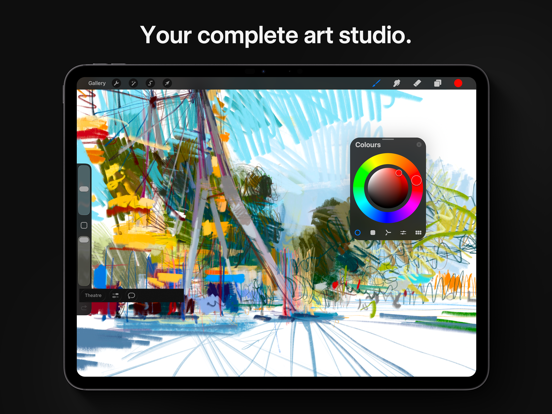
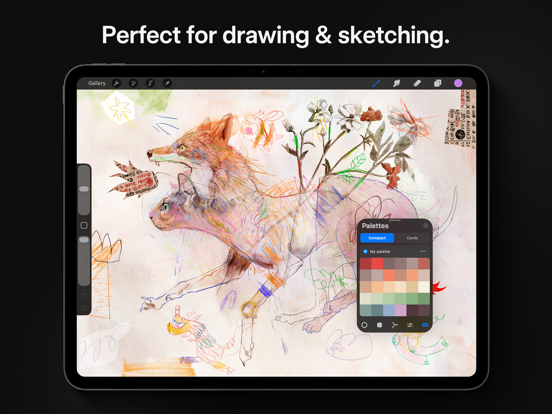
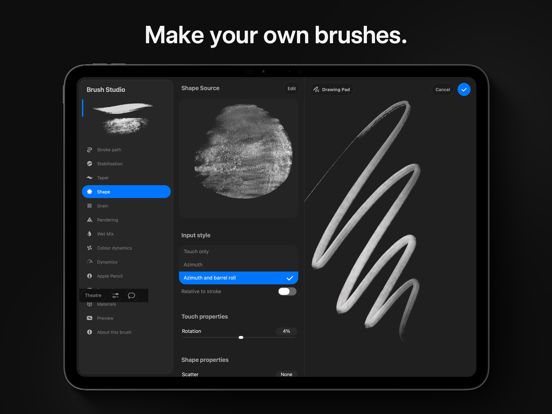
Loved by creative professionals and aspiring artists alike, Procreate is the leading creative application made for iPad. Procreate has everything you need to create expressive sketches, rich paintings, gorgeous illustrations, and beautiful animations. Offering 100s of handmade brushes, a suite of industry-leading artistic tools, an advanced layer system, and the powerful Valkyrie graphics engine. It’s a complete art studio you can take anywhere. Highlights: - High resolution canvases — up to 16k by 8k on compatible iPad Pros - Beautifully intuitive interface made for iPad and Apple Pencil - Revolutionary QuickShape feature for perfect shapes - Smooth and responsive smudge sampling - 3D Painting with Lighting Studio, exportable as models, images, or animations - Powered by Valkyrie, the lightning-fast 64-bit painting engine - Speed up your workflow with keyboard shortcuts - Create art in stunning 64-bit colour - Continuous auto-save — never lose work again Breakthrough brushes: - Packed with hundreds of beautifully crafted brushes - Organise your brushes into sets and libraries - Add Metallic and Roughness for painting in 3D - Brush Studio — with over 100 customisable settings - Import and export custom Procreate brushes - Import Adobe® Photoshop® brushes, and run them faster than Photoshop® Full-featured layering system: - Layer your art for precise control over details and composition - Create Layer Masks and Clipping Masks for non-destructive editing - Stay organised by combining layers into Groups - Select multiple layers to move or Transform objects simultaneously - Access over 25 layer blend modes for industry-grade compositing Colour without compromise: - Fill your line work with ColorDrop and SwatchDrop - Disc, Classic, Harmony, Value, and Palette colour panels - Import colour profiles for colour matching - Assign Colour Dynamics to any brush Precision design tools: - Add vector text to your illustrations - Easily import all your favourite fonts - Crop and resize your canvas for perfect composition - Perspective, Isometric, 2D, and Symmetry visual guides - Drawing Assist perfects your strokes in real time - StreamLine and stabilisation smooths strokes for beautiful calligraphy and expert inking - Use Scribble to name layers, change settings, and create text Accessibility features: - Advanced stroke stabilisation - Dynamic Type, VoiceOver, and Feedback Sounds - Assignable single-touch gestures - Color naming Animation and Page Assist - Easy frame-by-frame animation with customisable onion skinning - Create storyboards, GIFs, animatics, and simple animations - Sketch page-by-page concepts or begin a comic with Page Assist - Import, edit, and share PDFs Dramatic finishing effects: - Brush in image adjustments and effects with Apple Pencil - Glitch, Chromatic Aberration, Bloom, Noise, and Halftone add new dimensions to your work - Gaussian, Motion, and Perspective Blur filters create depth and movement - Powerful image adjustments including Colour Balance, Curves, HSB, and Gradient Map - Bring your art to life with the fun, intuitive, and creative Warp, Symmetry, and Liquify Dynamics Time-lapse replay - Relive your creative journey with Procreate’s Time-lapse Replay - Export your Time-lapse recording in 4K for high-quality video production - Share a shorter 30-second Time-lapse on your socials Import assets and share your creations: - Import or export your art as Adobe® Photoshop® PSD files - Import Adobe® ASE and ACO Color Palettes - Import image files such as JPG, PNG, and TIFF - Export your working files in layered .procreate or PSD file formats - Share your art as TIFF, transparent PNG, multi-page PDF, web-ready JPEG, OBJ, USDZ, and animated GIFs, PNGs, and MP4s

See this store page in another country

Prices, ranks and reviews are per country. Revenue above is already worldwide.

More from Savage Interactive Pty Ltd

Procreate Pocket
Graphics & Design
2.2K ratingsAnalyze →
Procreate Dreams
Photo & Video
72 ratingsAnalyze →