ASO keywords
Most repeated terms in the listing. Highlighted ones also appear in the title.
und38die18plex16und mehr11auf11filme10serien9von9mehr8oder8streaming8streame7live7und serien6serien und6live sendungen6plex pass6verl ngerung6sendungen6ger6deine6inhalte5aus5ist5
What's new in 2026.20.0
NEW:
- Added a manage button to the user switcher that opens Plex Home settings.
- Advanced options when scheduling a Live TV recording, including starting early and ending late.
- Artwork fades in as it loads and crossfades when it changes.
- Closed state for discussions, with a lock on cards and a notice explaining why a discussion was closed.
- Opening a notification for a comment, reaction, mention or new follower now marks it as read in Notifications.
- Rounded search fields on the search, people and settings screens, matching the web app.
- Tapping the Live TV tab now opens the source picker when more than one Live TV source is available
- Theme music can play on movie and collection detail pages.
- Zero state for the watch history screen.
FIXES:
- A completed download with a missing poster showed an empty box.
- A library briefly showed two columns of loading placeholders before switching to three.
- Activity cards could show another card's Read more button.
- After subscribing, the paywall could briefly reappear before the new subscription was recognized.
- Album detail screens were missing their related items hubs.
- Album detail screens would flash/flicker when opened.
- Artwork downloaded again after switching networks, such as between home Wi-Fi and mobile data.
- Artwork on screen took longer than it should to come back after leaving the player.
- Artwork that failed or was slow to load stayed blank instead of showing its title.
- Artwork tiles turned a darker shade between their loading placeholder and their artwork appearing.
- Cast and crew would not appear on some libraries.
- Confirmation for deleting an episode was not always clear.
- Download rows could show another download's poster.
- Downloads could fail to start for items with missing artwork.
- Editing the avatar could result in a low quality image.
- Expanded hubs could show loading placeholders in the wrong shape.
- Fixed downloads not working for some people after the app was closed while it was updating its downloads list.
- Grid loading placeholders sat lower than the content that replaced them.
- Items within a list could be slightly overlapped.
- Live TV: The bottom of the guide was hidden behind the tab bar.
- Long album names were cut off on the album screen.
- Music library recommendations loaded with poster-shaped placeholders.
- Player: Live TV channels with a space in their channel ID (e.g. from a VBox gateway) failed to tune.
- Player: Playback speed went back to normal after moving to the next item.
- Player: Prefer displaying a track's artist when it differs from the album artist.
- Player: Remote playback failed when the server converted the video to an image format.
- Player: The post-play screen overlapped the status bar on iPad.
- Player: The seek preview did not match the aspect ratio of the video after changing the display mode.
- Recent searches on the search screen sat right up against their heading.
- Remote Watch Pass could advertise a free trial to accounts that were no longer eligible for one.
- Rows and headers could briefly settle slightly out of place after scrolling.
- Rows with badges or a "New episode" style line under their tiles were taller than the rows around them, leaving uneven gaps.
- Scrolling Edit Metadata could mix up field values or hide unsaved edits.
- Scrolling after swiping a row open could show Remove on another row.
- Search field placeholders were invisible while typing.
- Search results sat further from the right edge of the screen than the left.
- Search settings no longer list servers that can't return any search results, such as one that only shares a single item with you.
- Sending a follow or friend request could change another person's buttons.
- Server Dashboard: Prefer displaying a track's artist when it differs from the album artist.
- Server dashboard was not showing a zero state for offline servers
- Shared servers in All Libraries were not sorted alphabetically by the person sharing them
Released Aug 31, 2010. Current version shipped Oct 13, 2026.
Store description
Streame Filme und Serien und mehr als 100 Live-Sender – sofort und ohne Abo. Genieße beste Unterhaltung, egal ob es sich um die neuesten TV-Serien, die beliebtesten Filme oder Live-Sendungen handelt. Jetzt kannst du Inhalte aus dem gesamten Streaming-Universum auf deinem eigenen Server oder in deiner eigenen Bibliothek entdecken, egal wo du bist.
Schau dir bekannte Serien an oder entdecke brandneue Unterhaltung mit dem kostenlosen Streaming-Service von Plex. Streame TV-Serien auf Abruf und genieße Live-Sendungen von überall aus und auf jedem Gerät! Entertainment für die ganze Familie – von Food und News über Sport und Kinderunterhaltung bis hin zu internationalen Filmen, Serien und mehr!
Bleib auf dem Laufenden dank Nachrichtensendern und Live-Streaming von Plex.
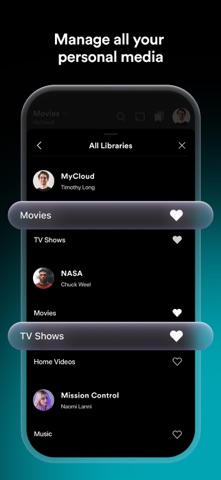
Plex ist eine Medienserver-Lösung, die deine persönlichen Medien organisiert. Stelle deine eigene Film-, Fernseh- und Musiksammlung zusammen und streame Inhalte von überall aus und auf all deinen Geräten.
Streame Live-Sendungen, schau dir kostenlose Filme an und entdecke neue Serien und mehr mit Plex!
PLEX FEATURES:
Kostenlose Streaming-App:
- Streame TV-Sendungen & genieße über 100 Sender und gratis Live-TV
- Inhalte für die ganze Familie: Kindersendungen, Nachrichten, Sport und mehr
- Upgrade auf das ultimative TV-Erlebnis zum Streamen und Aufnehmen von lokalen Sendungen, Nachrichten und Sport
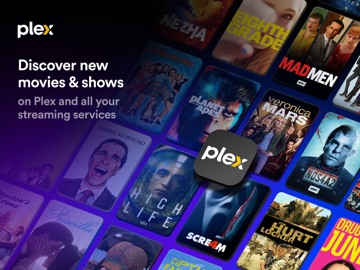
- Entdecke die brandneuen Inhalte von Streaming-Diensten
Filme überall ansehen:
- Filme kostenlos und jederzeit online ansehen
- Neue Filme, Kultklassiker und mehr on demand und kostenlos streamen
- Kostenlose Filme aus allen Kategorien: Actionfilme, Kinderfilme, Anime-Filme, Dramen, Komödien und mehr
TV-Kanäle und Serien:
- TV-Streaming und Serien überall, on demand und auf jedem Gerät
- Genieße deine Lieblingsserien oder entdecke neue Unterhaltung für die ganze Familie
Kostenloser Musik-Medienserver und Video-Streaming:
- Plex scannt und organisiert deine Dateien und sortiert Medien automatisch und intuitiv in deiner Plex-Bibliothek
- Speicher all deine persönlichen Medien wie Musik, Filme und Serien und streame sie auf jedem Gerät
Lade Plex noch heute herunter und streame Filme, Live-Sendungen, Musik und mehr!
Besuche https://www.plex.tv/free für weitere Informationen.
Hinweis: Wenn du die App bereits im App Store gekauft hast oder einen Plex Pass besitzt, musst du sie NICHT erneut kaufen! Dein vorheriger Kauf wird automatisch anerkannt.
Hinweis: Die Wiedergabe von Medien aus deiner Plex Bibliothek auf mobilen Geräten ist begrenzt (eine Minute für Musik und Video und Wasserzeichen auf Fotos), bis die App freigeschaltet ist. Um den vollen Funktionsumfang zu nutzen, benötigst du einen Plex Pass ODER einen kleinen, einmaligen In-App-Kauf für den Zugang zur App. Für das Streaming persönlicher Medien auf anderen Geräte muss die Version Plex Media Server 1.18.3 oder eine neuere installiert sein. DRM-geschützte Inhalte, ISO-Disc-Images und video_ts-Ordner werden nicht unterstützt. Einige Funktionen dieser App werden durch interessenbasierte Werbung unterstützt. Um mehr darüber und deine Möglichkeiten zu erfahren, schau dir die Plex-Datenschutzrichtlinien an.
Die App bietet einen Plex Pass In-App-Kauf an (ist aber nicht erforderlich). Plex Pass ist für umgerechnet 4,99 US-Dollar monatlich über dein iTunes-Konto, jährlich für umgerechnet 39,99 US-Dollar oder als einmalige lebenslange Zahlung für umgerechnet 149,99 US-Dollar erhältlich. Abos verlängern sich automatisch, es sei denn, die automatische Verlängerung wird in deinem iTunes-Konto mindestens 24 Stunden vor Ablauf des aktuellen Zeitraums deaktiviert. Dein Konto wird innerhalb von 24 Stunden vor Ablauf des aktuellen Zeitraums für die Verlängerung belastet, wobei für die Verlängerung derselbe Preis gilt. Du kannst das Abo verwalten und die automatische Verlängerung deaktivieren, indem du nach dem Kauf die Einstellungen in deinem iTunes-Konto aufrufst.
See this store page in another country
Prices, ranks and reviews are per country. Revenue above is already worldwide.

 Kito-chat, vídeo, llamada$117.5K a month EST
 Rooms (formerly Kiss Kiss 2.0)$117.5K a month EST
 Talkie: Creative AI Community$118K a month EST
 Noor Play$118.1K a month EST
 Galaxy Play - Digital Cinema$116.3K a month EST
 PLAYONE陪玩 - 解決你的無聊!$115.4K a month EST
 SeaU Chat - Voice Party Rooms$114.8K a month EST
 DreamLike Lite - Video & Chat$114.8K a month EST