ASO keywords
Most repeated terms in the listing. Highlighted ones also appear in the title.
data8battery usage8battery7threat protect6data battery6threat5protect5network5usage5vpn5technology4smartvpn technology3user data3smartvpn3mobile3ensure3cellular3tapping3automatically3reporting3help2threats2protection2features2
What's new in 4.1.1
Threat Protect (previously T-Mobile Secure Wi-Fi) introduces seamless protection that blocks threats across every app and network. From phishing emails to smishing texts and malicious links in social apps, you are covered.
Released Sep 21, 2022. Current version shipped Apr 9, 2026.
Store description
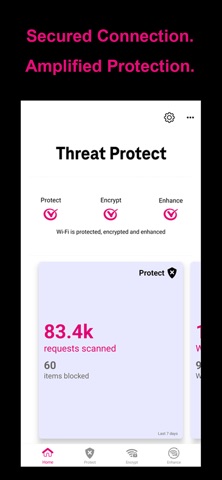
When enabled, Threat Protect uses SmartVPN® technology to help block threats across every network and app - not just the browser. From malicious links in phishing emails. smishing texts and social apps, protection is seamless and continuous. Three enterprise-grade, T-Mobile secure features help ensure you are best protected and connected:
Protect
Powered by real-time insights to keep you ahead of evolving threats – no manual updates, no guesswork.
T-Mobile’s industry-leading 5G network delivers increased security without slowing you down like traditional VPNs.
Encrypt
Unlike old-school VPNs that break apps, Threat Protect works at the network layer – helping to ensure all user data is encrypted, no matter what app you’re using. No blind spots. No friction.
Even if you are on public Wi-Fi or cellular roaming network, you are covered with no gaps or interruptions.
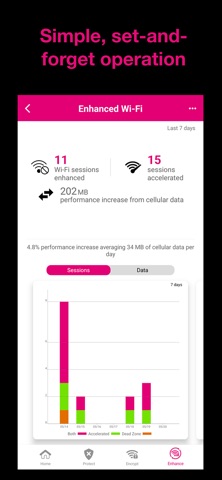
Enhance
Industry-first patented technology proven to solve Wi-Fi “dead zones”.
Enhances connectivity by tapping into America's largest and fastest 5G network with patented Wi-Fi bonding technology, so you never need to turn off Wi-Fi.
NOTE: you may want to disable this feature if you have a limited cellular data plan.
HOW IT WORKS
SmartVPN® technology automatically and intelligently applies threat protection, encryption and wifi+cellular bonding only when necessary to ensure the fastest possible performance and most efficient battery usage of any VPN.
The ‘VPN’ icon will be visible on the Status Bar of your device while any of features are running. You also will see occasional notifications when status changes in the app and as you connect and disconnect from Wi-Fi.
Automatically encrypts user data when you connect to Wi-Fi networks. Avoids re-encrypting of HTTPS for faster performance, less battery usage and compatibility with all apps and video services.
IMPORTANT NOTES
Please note that if you check the data or battery usage on your phone, it may appear as though this app is using a lot of data and battery. However, this app isn’t actually using all that data/battery. Reporting for the data/battery usage has been shifted from your other apps to this one, because your data now passes through this app so it can manage your security and connectivity. Actual battery usage will be minimal – less than 5% on average.
Threat Protect's SmartVPN® leverages the VPN capability provided by the mobile OS, which has a limitation where there can only be a single VPN app running at any time. When you use another VPN app, Threat Protect will automatically disable itself to avoid any conflicts.
Reporting an issue with the application is performed by tapping the Menu (upper right corner of the app) and then tapping ‘Report problem.’ When reporting a problem, please be as specific as you can.
See this store page in another country
Prices, ranks and reviews are per country. Revenue above is already worldwide.