← Back to charts
Homie—Menu Bar App for HomeKit icon
APP STORE

Homie—Menu Bar App for HomeKit

riedel.wtf apps S.L. · Utilities · United States store
NOT IN TOP 100 HERE
View on App Store ↗
Revenue a month, worldwide
Too small to estimate
Not enough chart or ratings data
New ratings
Tracking
Daily counts start building from today
Rating
0.0 of 5
0 ratings in this store
Countries it ranks in
0
was 0 on Oct 15, 2026

Revenue

Estimated from the grossing charts of Oct 21, 2026 in the 53 countries we track, and ratings growth on the App Store.

EST. REVENUE / MONTH · WORLDWIDE
Unranked
Not in any grossing chart, and too few ratings (0) to read its growth. Most apps at this stage earn little or nothing.
EST. LIFETIME DOWNLOADS
n/a
Estimated from ratings count
RATINGS
0
AVG RATING
n/a
PRICE
Free
AGE
5.9y
LAST UPDATE
419d ago
VERSION
1.3
SIZE
7 MB
AGE RATING
4+

Last 29 days

From our daily snapshots of every grossing chart.

DAYS IN A GROSSING CHART
0 / 29
COUNTRIES NOW
0 (was 0)
EST. REVENUE FROM CHARTS, DAILY · APP STORE ONLY EST
Show daily values
Sep 24, 2026not in a grossing chart
Sep 25, 2026not in a grossing chart
Sep 26, 2026not in a grossing chart
Sep 27, 2026not in a grossing chart
Sep 28, 2026not in a grossing chart
Sep 29, 2026not in a grossing chart
Sep 30, 2026not in a grossing chart
Oct 1, 2026not in a grossing chart
Oct 2, 2026not in a grossing chart
Oct 3, 2026not in a grossing chart
Oct 4, 2026not in a grossing chart
Oct 5, 2026not in a grossing chart
Oct 6, 2026not in a grossing chart
Oct 7, 2026not in a grossing chart
Oct 8, 2026not in a grossing chart
Oct 9, 2026not in a grossing chart
Oct 10, 2026not in a grossing chart
Oct 11, 2026not in a grossing chart
Oct 12, 2026not in a grossing chart
Oct 13, 2026not in a grossing chart
Oct 14, 2026not in a grossing chart
Oct 15, 2026not in a grossing chart
Oct 16, 2026not in a grossing chart
Oct 17, 2026not in a grossing chart
Oct 18, 2026not in a grossing chart
Oct 19, 2026not in a grossing chart
Oct 20, 2026not in a grossing chart
Oct 21, 2026not in a grossing chart
Oct 22, 2026not in a grossing chart
Best rank Sep 24, 2026: not ranked. Now: not ranked. Days at zero are days outside every grossing chart.

Money and momentum

Measured from the store, not estimated.

WHAT IT CHARGES
2 purchases listed
  • Homie Pro$9.99
  • Homie Pro Lifetime Unlock$25.99
Top in-app purchases as listed on the App Store, in local prices.
REVIEW MOMENTUM
0.1 reviews / week
  • Trendfalling
  • Recent reviews average2.9 stars
  • Recent 1 and 2 star share42%
From the latest 36 written reviews, covering 2170 days.
RELEASE CADENCE
0 updates in 90 days
  • Typical gap between releases14 days
From the last 23 versions listed on the App Store.

What users say

Latest reviews, United States App Store.

★★★★★Sep 27, 2026
Support without Rosetta?

I have enjoyed using this app but I have been notified that this needs update to be able to run in future updates without rosetta. I would like to do away with rosetta and use it natively. Any plan to keep going or make it abandonware?

★★★★★Aug 15, 2024
Abandoned?

This app appears to have been abandoned by the developer. It was a cool idea a few years ago when it was released, which made dealing with some rough edges tolerable. Now it just seems broken in too many ways. Proceed with caution.

★★★★★Mar 31, 2024
Does not work in Sonoma 14.4.1

This app is a great idea, and it worked for a week on a 2020 MBP. However, I bought a M3 MBP yesterday and Homie will not work properly. It keeps creating blank/white popup windows that certainly require input from me (or permissions)...but they are blank. Can't manipulate the software. I had to buy a newer version of this type of app and I think it's from the same developer. Waste of $10.

★★★★★Jan 6, 2024
No longer works

The app no longer works on Sonoma. Hopefully I'll get a refund...

★★★★★Oct 19, 2023
Needs work

Installed on Mac Studio M2 running Sonoma. All application screens are blank. The windows have title but nothing inside them. Bug?

★★★★★May 16, 2023
Installed and Immediately Removed

Items would not keep in sync. For example, turned on a switch but Homie still indicated it was off. Double checked the Home app, and the device was on. Also irritating that menu would not stay open.

Store screenshots

ScreenshotScreenshotScreenshotScreenshotScreenshot

App Store ads

Apple Search Ads this app ran in the last 90 days, from Apple's public ad repository.

Apple's ad repository couldn't be reached right now. Try again later.

Growth research

Where this app is buying and earning its users. Each link opens pre filtered.

ASO keywords

Most repeated terms in the listing. Highlighted ones also appear in the title.

scenes5homie4homekit devices3menu bar3global keyboard3keyboard shortcuts3automation triggers3macos big3big sur3homekit3keyboard3shortcuts3computer3scene3add3control2devices2menu2bar2quick2global2automation2triggers2working2

What's new in 1.3

This update contains numerous bug fixes: - Ensures that pinned accessories are displayed reliably after restarting the app. - Ensures that ACs can be set to cool state and don’t randomly switch to heat. - Ensure that sliders have the correct min / max values. - Adds room name under pinned accessories. - Fixes an issue where turning on / off all lights of a room would not refresh the buttons reliably. - Fixes an issue where the accessories could get stuck and would not refresh. - Fixes an issue where controls of accessories would not show up reliably.

Released Nov 11, 2020. Current version shipped Aug 28, 2025.

Store description

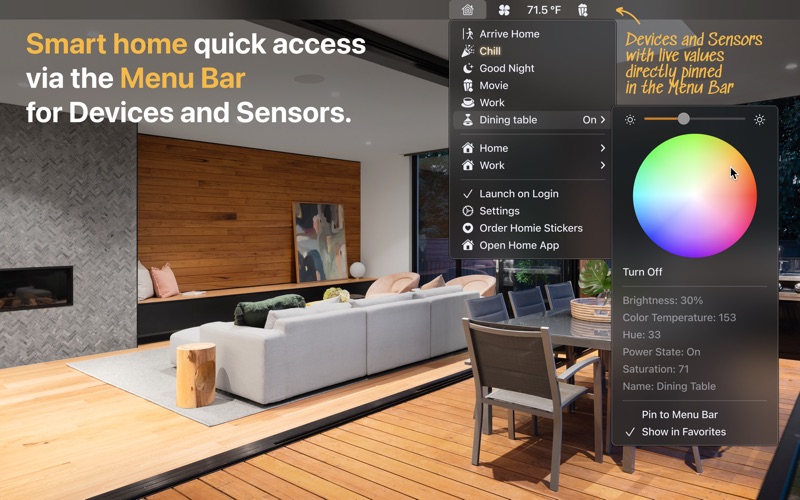
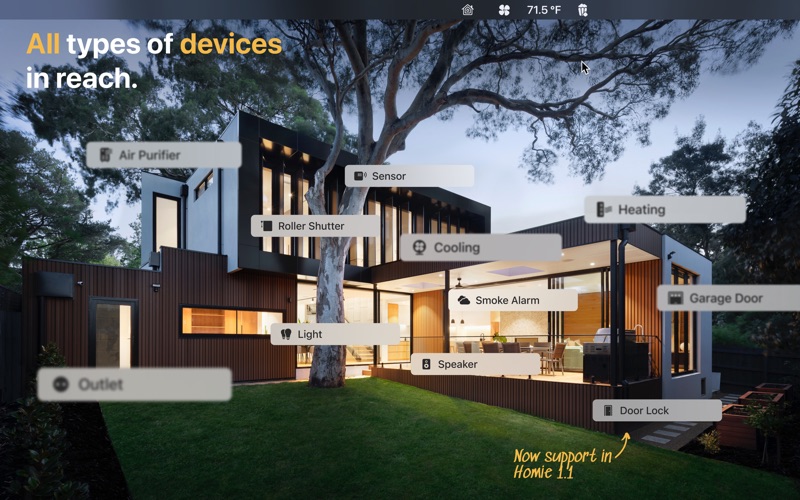
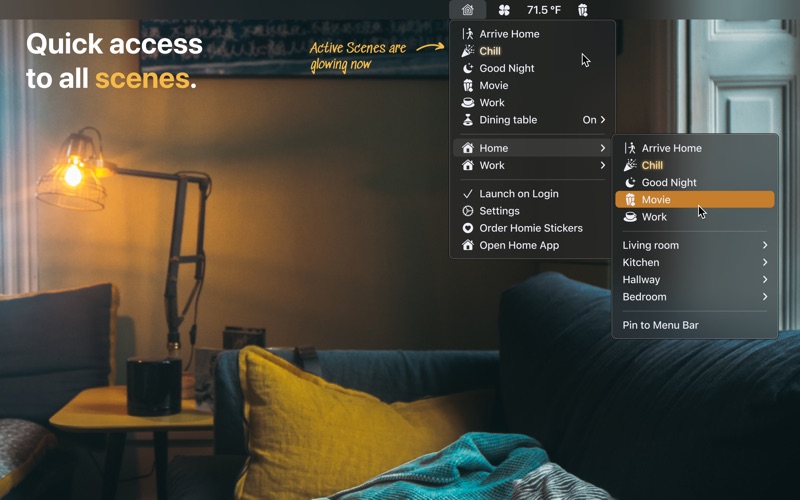
Control your HomeKit devices from your menu bar—that's quick and easy. You can even setup global Keyboard shortcuts or automation triggers that enable different scenes automatically. For example, I have assigned my F5 and F6 keys to dedicated scenes…very handy to handle your HomeKit devices from your keyboard, while you‘re working at your computer anyway. And of course you can assign all kinds of shortcuts to any scene, such as ⌘⇧N for “Good Night”. On my desk, waking up my Mac enables my working light scene…while bringing the computer to sleep turns it off again. That‘s basically it – a quick & simple app. Homie makes use of the new HomeKit framework for Catalyst Apps in macOS 11 Big Sur – that's why macOS Big Sur is required in order to use Homie. Available Subscription Option (annually): Homie Pro Subscription to get access to all Pro Features: - Add favorite scenes, so they can be reached with one click in the app. - Pin sensors to your menu bar, so you can see them with one glance. - Add global keyboard shortcuts, so you can control your scenes super-fast. - Add automation triggers for your scenes (e.g. unlocking your computer turns on a specific scene). Terms & Privacy Policy: https://homie.frogg.io/privacy

See this store page in another country

Prices, ranks and reviews are per country. Revenue above is already worldwide.

More from riedel.wtf apps S.L.

one sec | screen time + focus
Productivity
23.7K ratingsAnalyze →
iRedstone
Education
449 ratingsAnalyze →
Redpoint: Bouldering, Climbing
Sports
566 ratingsAnalyze →
Processing & p5.js iCompiler
Developer Tools
83 ratingsAnalyze →
Minimal Launcher – on point
Productivity
1 ratingsAnalyze →
iRedstone for Minecraft
Education
0 ratingsAnalyze →
PhotoCalc—Image Calculator
Utilities
12 ratingsAnalyze →
Reflective Journal & Tracker
Health & Fitness
34 ratingsAnalyze →
ScreenTime+ | Focus App Block
Productivity
20 ratingsAnalyze →