← Back to charts
みんなの縦型カレンダー icon
APP STORE

みんなの縦型カレンダー

Funeasy Soft, Inc. · Productivity · Japan store
NOT IN TOP 100 HERE
View on App Store ↗ Google Play version →
Revenue a month, worldwide EST
$52K
Likely $17.3K to $156K
New ratings
Tracking
Daily counts start building from today
Rating
4.6 of 5
14.4K ratings in this store
Countries it ranks in
0
was 0 on Oct 15, 2026

Revenue

Estimated from the grossing charts of Oct 21, 2026 in the 53 countries we track, and ratings growth on the App Store.

EST. REVENUE / MONTH · WORLDWIDE · BOTH STORES
$52K
Range $17.3K to $156K
EST. REVENUE / YEAR · WORLDWIDE
$624.1K
Both stores combined. Small app estimate, so no split per store
EST. LIFETIME DOWNLOADS
504.1K to 1.4M
Estimated from ratings count
WHERE IT EARNS · EST. / MONTH
  • Japan #96 Productivity (Play)$52K · 100%
HOW SURE ARE WE
Small app: combines its grossing ranks with ratings growth (187 new ratings a month on average since launch). Tested on 418 apps with verified revenue: typically off by about 2.4 times, so the range is wide. Countries we don't track (and Google Play in China, which doesn't exist) aren't included, and neither are ads or web payments. Gross revenue before store fees.
RATINGS
14.4K
AVG RATING
4.57
PRICE
無料
AGE
6.4y
LAST UPDATE
3d ago
VERSION
7.9.1
SIZE
143 MB
AGE RATING
4+
Last 29 days

From our daily snapshots of every grossing chart.

DAYS IN A GROSSING CHART
0 / 29
COUNTRIES NOW
0 (was 0)
EST. REVENUE FROM CHARTS, DAILY · BOTH STORES ONLY EST
Show daily values
Sep 24, 2026not in a grossing chart
Sep 25, 2026not in a grossing chart
Sep 26, 2026not in a grossing chart
Sep 27, 2026not in a grossing chart
Sep 28, 2026not in a grossing chart
Sep 29, 2026not in a grossing chart
Sep 30, 2026not in a grossing chart
Oct 1, 2026not in a grossing chart
Oct 2, 2026not in a grossing chart
Oct 3, 2026not in a grossing chart
Oct 4, 2026not in a grossing chart
Oct 5, 2026not in a grossing chart
Oct 6, 2026not in a grossing chart
Oct 7, 2026not in a grossing chart
Oct 8, 2026not in a grossing chart
Oct 9, 2026not in a grossing chart
Oct 10, 2026not in a grossing chart
Oct 11, 2026not in a grossing chart
Oct 12, 2026not in a grossing chart
Oct 13, 2026not in a grossing chart
Oct 14, 2026not in a grossing chart
Oct 15, 2026not in a grossing chart
Oct 16, 2026not in a grossing chart
Oct 17, 2026not in a grossing chart
Oct 18, 2026not in a grossing chart
Oct 19, 2026not in a grossing chart
Oct 20, 2026not in a grossing chart
Oct 21, 2026not in a grossing chart
Oct 22, 2026not in a grossing chart
Best rank Sep 24, 2026: not ranked. Now: not ranked. Days at zero are days outside every grossing chart. Small app: scaled like the revenue estimate above, so the line shows the trend on the same scale.

Money and momentum

Measured from the store, not estimated.

WHAT IT CHARGES
No in-app purchases
Earns from its upfront price, ads or payments outside the store.
REVIEW MOMENTUM
Too few reviews
Fewer than 3 recent written reviews in this country.
RELEASE CADENCE
18 updates in 90 days
  • Typical gap between releases6 days
From the last 25 versions listed on the App Store.
RATING BREAKDOWN
14.4K ratings
5★70%
4★20%
3★7%
2★1%
1★1%

Store screenshots

ScreenshotScreenshotScreenshotScreenshotScreenshotScreenshotScreenshotScreenshotScreenshotScreenshot

App Store ads

Apple Search Ads this app ran in the last 90 days, from Apple's public ad repository.

Apple's ad repository couldn't be reached right now. Try again later.

Growth research

Where this app is buying and earning its users. Each link opens pre filtered.

ASO keywords

Most repeated terms in the listing. Highlighted ones also appear in the title.

Listing too short to analyze

What's new in 7.9.1

連続入力、日記、メッセージを使わない方のために、カレンダーだけを表示する機能を追加しました。左上のメニューの歯車マークから変更できます。共有者全員に影響しますので、ご注意のうえ設定してください。

Released May 14, 2020. Current version shipped Oct 18, 2026.

Store description

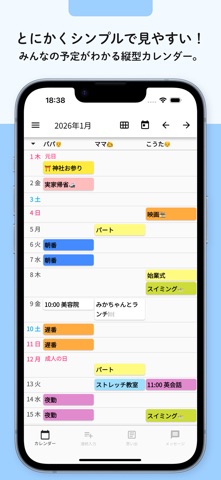
家族・友達・グループで予定を共有できる、縦型のカレンダーアプリです。 人ごとに列が分かれた見やすい予定表で、誰がいつ何をするのかが一目でわかります。 共有カレンダーとして、何人でも無料で使えます。 ■ こんな使い方に ・家族のスケジュール管理(子供の習い事、部活、学校行事) ・夫婦やカップルの予定共有 ・シフトや勤務表、当番の管理 ・サークルやグループのスケジュール帳 ■ 主な機能 ・人や項目ごとに縦に並ぶ予定表と、月間カレンダー表示 ・共有コードを送るだけでカレンダーを共有 ・予定の追加・変更をプッシュ通知でお知らせ、編集履歴も確認できる ・繰り返しの予定、日をまたぐ予定 ・ホーム画面のウィジェット ・着せ替えで好きなデザインに ・メッセージ、日記、連続入力(使わない方はカレンダーだけの表示にできます) ・機種変更しても、アカウントコードで復元 使い方 まずは左上のメニューから、「項目の編集」を選択して、管理したい人や、項目の登録を行います。項目を長押しして並び替えを変更することができます。項目を登録、編集したら、右上の保存ボタンで項目の編集を完了します。 縦型カレンダー画面にて、スケジュールをいれたい項目と日付が交差する場所をクリックして、スケジュールを登録します。追加されたスケジュールは次回以降、履歴から入力ボタンを押して簡単に入力することができます。 保存するとスケジュール画面に反映されます。右上の矢印ボタンで月を変更し、カレンダーアイコンで現在の日付に移動できます。 入力、編集、削除されたスケジュールは、左上のメニューの編集履歴から確認できます。 スケジュールを長押しして離すと、編集、移動、コピー、削除をより早く行うことが可能です。 作成したカレンダーを他のユーザーと共有したい場合は、左上のメニューの「このカレンダーを他の人へ共有」から共有コードをコピーし、共有したいユーザーに送ります。 共有コードを受け取ったユーザーは、アプリをダウンロードし、「カレンダーの共有コードをお持ちの方」の欄に共有コードを入力します。すでにご利用の方は「共有コード入力」から共有できます。 参加・作成できるカレンダーは5つまでです(プレミアムは10まで。有料カレンダーへの参加は、無料でも10まで)。左上のメニューからカレンダーの切り替え、追加、削除を行えます。 カレンダーに変更があると、共有ユーザー全員にプッシュ通知で変更が通知されます。通知が不要な場合はiPhoneの設定からオフにできます。 カレンダー毎に通知設定を変更したい場合は、左上のメニューの歯車マークから設定できます。 メッセージ機能 共有ユーザーへメッセージを送ることができます。メッセージを入力して送信ボタンを押すと全ユーザーへプッシュ通知が送信されます。色や送信者の登録も可能です。メッセージを長押しでコピー・削除できます。 日記機能 日記タブから写真やテキストで日記を追加できます。 写真の登録 月最大10件登録できます。プレミアムに加入すると50件まで登録できます。 バックアップ サーバ上にバックアップされているため、アカウントコードを覚えておけば端末の紛失や機種変更時にも復元できます。カレンダーの利用が1年以上ない場合、写真のみ削除されることがあります。

See this store page in another country

Prices, ranks and reviews are per country. Revenue above is already worldwide.