← Back to charts
Controller for HomeKit icon
APP STORE

Controller for HomeKit

acasa Software GmbH · Lifestyle · United States store
NOT IN TOP 100 HERE
View on App Store ↗
Revenue a month, worldwide EST
$19.8K
Likely $6.6K to $59.3K
▲ 347.6% in 16 days
New ratings
Tracking
Daily counts start building from today
Rating
4.1 of 5
2.8K ratings in this store
Countries it ranks in
4
was 6 on Oct 15, 2026

Revenue

Estimated from the grossing charts of Oct 21, 2026 in the 53 countries we track, and ratings growth on the App Store.

EST. REVENUE / MONTH · WORLDWIDE · APP STORE
$19.8K
Range $6.6K to $59.3K
EST. REVENUE / YEAR · WORLDWIDE
$237.4K
No Google Play version found
EST. LIFETIME DOWNLOADS
96.6K to 276K
Estimated from ratings count
WHERE IT EARNS · EST. / MONTH
  • Germany #67 Lifestyle$18.1K · 91%
  • Portugal #62 Lifestyle$696 · 4%
  • Ireland #95 Lifestyle$643 · 3%
  • Ukraine #54 Lifestyle$346 · 2%
HOW SURE ARE WE
Small app: combines its grossing ranks with ratings growth (59 new ratings a month on average since launch). Tested on 418 apps with verified revenue: typically off by about 2.4 times, so the range is wide. Countries we don't track (and Google Play in China, which doesn't exist) aren't included, and neither are ads or web payments. Gross revenue before store fees.
RATINGS
2.8K
AVG RATING
4.08
PRICE
Free
AGE
9.7y
LAST UPDATE
10d ago
VERSION
10.0.2
SIZE
210 MB
AGE RATING
4+

Last 29 days

From our daily snapshots of every grossing chart.

DAYS IN A GROSSING CHART
16 / 29
COUNTRIES NOW
4 (was 0)
EST. REVENUE A MONTH, DAILY · APP STORE EST
Show daily values
Sep 24, 2026not in a grossing chart
Sep 25, 2026not in a grossing chart
Sep 26, 2026not in a grossing chart
Sep 27, 2026not in a grossing chart
Sep 28, 2026not in a grossing chart
Sep 29, 2026not in a grossing chart
Sep 30, 2026not in a grossing chart
Oct 1, 2026not in a grossing chart
Oct 2, 2026not in a grossing chart
Oct 3, 2026not in a grossing chart
Oct 4, 2026not in a grossing chart
Oct 5, 2026$28.4K a month
Oct 6, 2026not in a grossing chart
Oct 7, 2026not in a grossing chart
Oct 8, 2026$21.2K a month
Oct 9, 2026$102.9K a month
Oct 10, 2026$114.7K a month
Oct 11, 2026$190.5K a month
Oct 12, 2026$198.1K a month
Oct 13, 2026$114.7K a month
Oct 14, 2026$155.3K a month
Oct 15, 2026$316K a month
Oct 16, 2026$146.4K a month
Oct 17, 2026$210.8K a month
Oct 18, 2026$179.3K a month
Oct 19, 2026$279.6K a month
Oct 20, 2026$318.5K a month
Oct 21, 2026$127.2K a month
Oct 22, 2026not in a grossing chart
The same estimate as the headline, saved every day. Best rank Sep 24, 2026: not ranked. Now: #48 Lifestyle · AT.

Money and momentum

Measured from the store, not estimated.

WHAT IT CHARGES
6 purchases listed
  • Controller Essentials$39.99
  • Controller Plus Lifetime$99.99
  • Controller Essentials$4.99
  • Controller Plus$79.99
  • Controller Plus Lifetime$139.99
  • Controller Plus$8.99
Top in-app purchases as listed on the App Store, in local prices.
REVIEW MOMENTUM
0.7 reviews / week
  • Trendrising
  • Recent reviews average2.3 stars
  • Recent 1 and 2 star share64%
From the latest 332 written reviews, covering 3446 days.
RELEASE CADENCE
4 updates in 90 days
  • Typical gap between releases10 days
From the last 25 versions listed on the App Store.
RATING BREAKDOWN
2.8K ratings
5★67%
4★9%
3★5%
2★3%
1★16%

What users say

Latest reviews, United States App Store.

★★★★★Oct 19, 2026
Made Things Right

Update: In October of 2026 they reversed course and now include all of the Plus features, including Hub Mode with lifetime licenses. Thanks for doing the right thing! It really is a great app, and I can once again recommend it. If you want to unlock more features of you Apple smart home but are intimidated by Home Assistant, the Controller app is a must-have. I bought a lifetime license for this app less than a year ago after they announced their new Hub Mode because I had a specific use case for it. It was expensive, but I felt okay about it because it was a one-time cost. But now they are putting that very feature behind a paywall, and I feel very much ripped off. It is a good app and unlocks a lot of hidden capabilities of HomeKit, but the Hub Mode was the selling point, and they totally pulled the rug out from under it. I get that they don’t sell hardware and need to make their money somehow, but if you think the feature is worth more, raise the price of the lifetime license moving forward, don’t go back and gouge the people who already paid for it.

★★★★★Oct 18, 2026
Excellent

Now that the developer has reversed course on the lifetime license issue, this has once again found a place in my workflow. Well done.

★★★★★Oct 17, 2026
Fantastic Update

Thanks for making Lifetime, lifetime again. So many features and always adding more!

★★★★★Oct 17, 2026
Automations are not deleted when deleting from HomeKit

The Controller for HomeKit is a great app. I purchased the lifetime quite a while back because I am a power smart home user. That said, I am always having to delete this app and reinstall to clear no longer used automations. When I have to redo an automation, it is NOT deleted in this app. I see automations with numbers, like (lights on) 1, 2, 3, 4, etc) and no way to just clear the list. Not only that, the list of the same automations (not being deleted) adds to the number of automations for Apple Home and when you think you only have 35-40 automations, it stops you from creating more because it is using the numbers in the Controller app. This is the most frustrating thing of the app. If you have fixed it, then thank you. I really want to build on this app for my home but it is an ongoing tedious and time consuming chore to clear old automations no longer in use. PLEASE PLEASE fix this! Thanks

★★★★★Oct 17, 2026
No way to try without purchase?

When launched, he app gives you the choice between two paid plans. Sorry,with no way to test and find out whether it does what I need, or is even any good at what it does, not going to just blindly pay and hope for the best. —— Update: the developer replied that there’s a 7-day trial, so I’ll look for that when I try again. I may have just missed it, but it wasn’t obvious how to do that.

★★★★★Oct 17, 2026
I went all in on workflows and wish I had never heard of Controller

I have the expensive lifetime subscription to this. I was all in on the controller app… Until iOS26 came out and even with the 7.7 update to support iOS 26 the app stopped working for me. It would crash within seconds of opening. Problems on iPhone, iPad, and Mac. None of the hubs would stay up for more than a few seconds. This brought my smart home down. They did not respond to any of my many support requests. Nothing. So painful. I’d built all my automations out with workflows in this app and nothing was working. Today I finished recreating my last controller specific workflow in a new Home Assistant set up I’ve moved to. Home Assistant is HARD and annoying to set up and configure so I’m so mad I had to do this. Controller failed me in the worst way. I’ve give it minus stars if I could. Avoid avoid avoid. ****** Apparently they have changed their ways and have asked for new reviews… I DON’T CARE. This company treated me terribly and I DON”T care what they do know. Don’t trust them. Do not buy this product or subscribe. No. No. No. I have “lifetime” and I deleted the app from these LIARS. There are better options. Do not give them a penny.

Apps like this

Same category, earning about as much.

Store screenshots

ScreenshotScreenshotScreenshotScreenshotScreenshotScreenshotScreenshotScreenshotScreenshotScreenshot

App Store ads

Apple Search Ads this app ran in the last 90 days, from Apple's public ad repository.

Apple's ad repository couldn't be reached right now. Try again later.

Growth research

Where this app is buying and earning its users. Each link opens pre filtered.

ASO keywords

Most repeated terms in the listing. Highlighted ones also appear in the title.

controller8devices7home6homekit5workflows5controller homekit5need4homekit matter3floor plan3controller hub3plan3per3device3charts3battery3conditions3automation3runs3setup3smart2matter2dashboards2yourself2steps2

What's new in 10.0.2

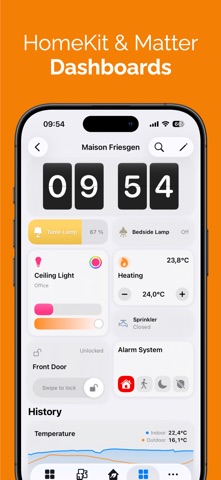
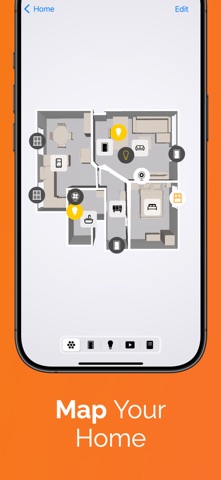
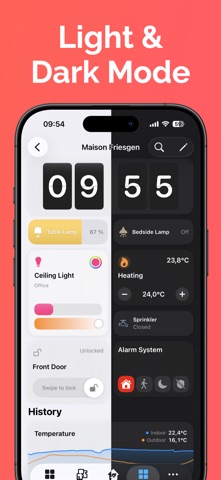
Controller 10 brings dashboards: views you build yourself, and Home Sharing, which passes your whole setup to the people you live with. - Dashboards: Build your own view from tiles, one per home, per person, and even per device. - More than 25 tile variants: Devices, scenes, workflows, time, weather, calendar, charts, battery warnings. In five standard sizes or freely resizable on the grid. - Start with AI: Describe the dashboard you want in one sentence, and Controller AI creates the sections and tiles. The result stays fully editable. - Visibility conditions: A tile or a whole section appears only when it is needed, based on time, weekday, weather, calendar, sun position or device states. - Home Sharing: Share your setup with your household. For each person you choose between the whole app or only the dashboards you share with them. - New search: Find devices, rooms, scenes, workflows, floor plans and settings, not only by name but also by the devices and actions they contain. - Floor plans from a picture: Use your own image as a floor plan and place your devices on it, no LiDAR sensor needed. - 3D floor plan: Now in Dark Mode too, with new gestures for rotating, zooming and tilting. - "Open Dashboard" widget: Open any dashboard straight from your Home Screen. - States, Zones and Service Groups: Sort your states, the rooms in a zone and the devices in a service group the way you need. - Faster loading: Large homes with a Controller Hub in particular load faster. - Plus many smaller improvements and bug fixes. Enjoy building your own view of your home.

Released Feb 16, 2017. Current version shipped Oct 12, 2026.

Store description

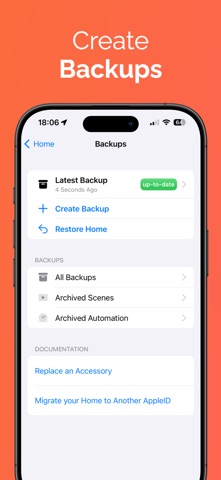
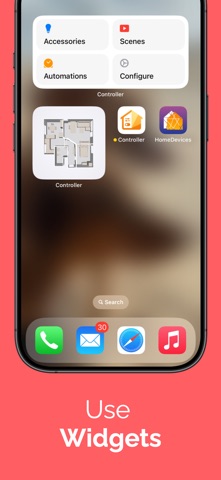
Get more out of your smart home. Your HomeKit and Matter devices can do more than on and off: Controller for HomeKit gives you dashboards you build yourself, workflows that run over several steps, months of history, and a floor plan you control directly. YOUR OWN DASHBOARD Your devices sit where you need them, instead of in a list. - Views you compose yourself from tiles: per home, per person, and if you want, per device. One for the iPad on the wall, one for the iPhone in your pocket. - More than 25 tile variants: devices, scenes, workflows, time, weather, calendar, charts, battery warnings. - Five standard sizes, or drag your own size on the grid. - Visibility conditions: a tile or a whole section appears only when you need it. - Plus widgets for your Home Screen and a view of your own on Apple Watch. CONTROLLER AI Describe what you need in plain language: a dashboard, a scene, an automation or a workflow. Controller builds it, and you adjust it however you like afterwards. MORE THAN A SCHEDULE Two devices become a sequence that thinks along. - Workflows: multiple steps, conditions and branches for sequences a single automation cannot express. - Automations with advanced triggers and conditions. - States: virtual switches that capture how your home currently stands and drive your workflows accordingly. - Custom notifications for anything you want to know about. - NFC tags: one tap and the workflow runs. YOUR SENSORS ARE ALREADY MEASURING Controller remembers the values and makes them readable. - Charts: see how temperature, humidity or battery level develop over weeks and months, across every device and brand. - Maintenance: which battery is empty, which device is unreachable, which automation is broken. - Logs: every activity and every change, traceable. - Smart folders: devices and automations grouped by filters you define. - Floor Plan: scan your home with the LiDAR sensor of your iPhone or iPad and control your devices right on the plan. - Controller Hub: a dedicated iPhone, iPad, Apple TV or Mac runs your workflows automatically. Charts and States require Controller Hub. SHARE THE WORK, NOT JUST THE SWITCHES - Home Sharing: pass your entire setup to the people you live with. For each person you choose between the whole app or only the dashboards you share with them. - Setup codes: your HomeKit and Matter codes stay safe in the app and never get lost. - Backups: save your setup and restore it whenever you need to. Controller for HomeKit runs on iPhone, iPad, Mac, Apple Watch and Apple TV. You already own the devices. Controller for HomeKit brings out what is in them. More on our website: https://www.controllerforhomekit.com Privacy Policy: https://controllerforhomekit.com/privacy/ Terms of Use: https://www.apple.com/legal/internet-services/itunes/dev/stdeula/

See this store page in another country

Prices, ranks and reviews are per country. Revenue above is already worldwide.

More from acasa Software GmbH

HomeDevices for HomeKit
Lifestyle
487 ratingsAnalyze →
SmartApfel
News
7 ratingsAnalyze →